A-Systems Logo

January 2012 Federal Tax Table Setup
for A-Systems JobView and Visual Bookkeeper Software

Justification for these tax table figures can be found in Publication 15 published on the IRS Website.

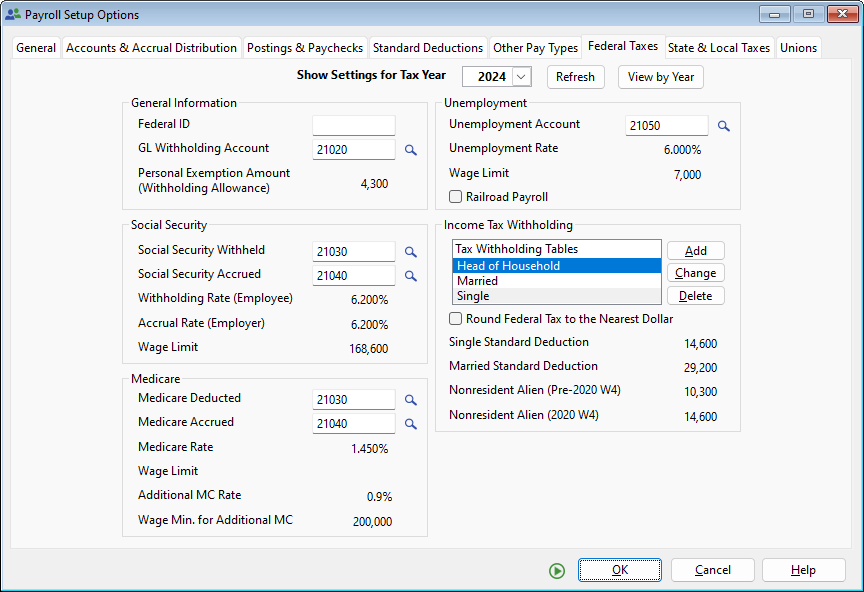
From the Setup menu, select Payroll Options. From Options, select Federal Tax Tables. The following screen will appear:

Federal Tax Setup Single Withholding Table Married Withholding Table

Fill in the highlighted fields as shown above. Your Federal ID number and G/L accounts are unique to your company. These you can find by pressing the ellipsis button next to the appropriate field.

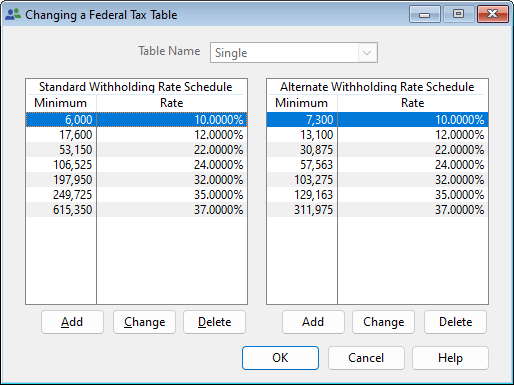
To insert the new numbers for the Federal Single Tax table, select the Single tax table and click the Change button.

The following screen will appear:

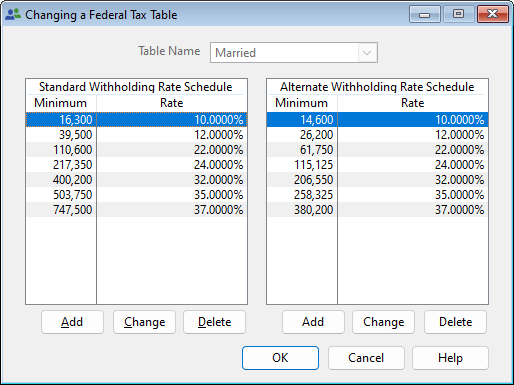
To insert the new numbers for the Federal Married Tax table, select the Married tax table and click the Change button, the following screen will appear:

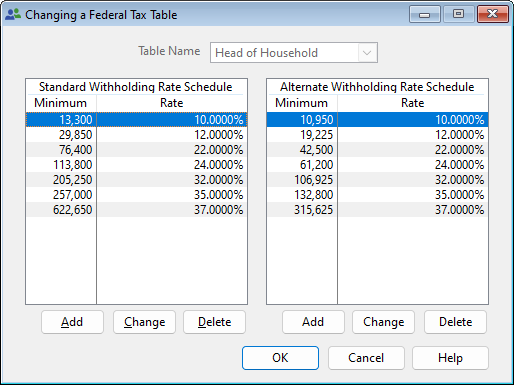
Enter the minimum amounts and percentages as shown above. Press OK to save your entries.

The Federal Single Tax and Federal Married Tax are both found in Publication 15, Circular E, Employer's Tax Guide, Section 16, Tables for Percentage Method of Withholding, Table 7 (Annual Payroll Period).


Technical Bulletin #512