JobView & Visual Bookkeeper Version 23.1
Now Available From A-Systems Corp.
A-Systems Corp. has released Version 23.1 of our popular, easy to use Accounting software packages, A-Systems JobView and Visual Bookkeeper. This release boasts lots of operational features requested by our loyal software users, as well as some exciting new capabilities everyone will enjoy! Just a few of these new features and capabilities are listed below.
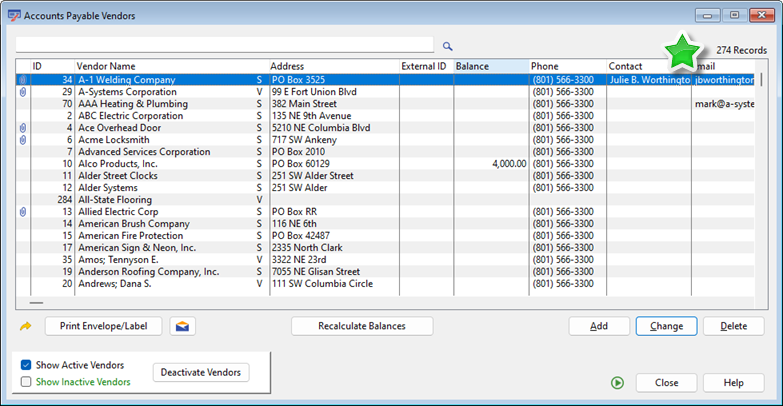
List boxes now show how many records are in the list.
- Throughout the application, all list boxes now show a counter that indicates the number of records in the list.
- Throughout the application, all report printing limit windows that include a "List" type limit now allow for saving and retrieving saved limit lists.
- The user can now apply color shading to the boxes on the check stub.
- Workers Compensation accrual can now have a Per Pay Period limit for each unique Workers Comp Craft Code.
- Added a new printing format for the Payroll Certification report for the state of California, the form A-1-131.
- On the Multi-Rate Breakdown section of the PR check stub, re-titled the total as "Gross Earnings" and added rows for "Total Deductions" and "Net Earnings".
- The system can now accrue "Use Tax" into a liability account during AP Invoice Posting.
- A new tab has been added to the Vendor Entry window titled "Payments". Individual payments are listed along with the invoices they paid for.
- When printing the JC Analysis Report, the system will now skip jobs for which no activity is being reported.
- JC Analysis Reports now have a shading band highlighting the beginning of each job.
|
- When printing a Change Order Form for a customer on a Contractor Draw job, you can now choose to print a Draw Style Change Order, instead of the standard Change Order form.
- When creating manual GL Transactions, a new screen allows the entry of desired balances for multiple accounts. The system will generate a group of transactions that adjust each account balance to the desired balance.
- Depreciation Entries can now be generated directly from the Equipment Setup browse window in Equipment Costing.
- When viewing a posted AR Invoice, the user can now edit the Invoice Date, Due Date, and Description.
- When entering a PO Line Item, the user can now specify whether this line item is "Subject to Shipping." This setting carries through to the AP Invoice when the PO is reconciled.
- In the Financial Statement Overview, you can now adjust the filter for viewing transactions to the highlighted account. You can see transactions for just the selected fiscal period, for the entire year, or for all time.
- The Purge procedure has received some modifications to make it simpler and safer.
|
New Features from Prior Versions:
Version 23.0
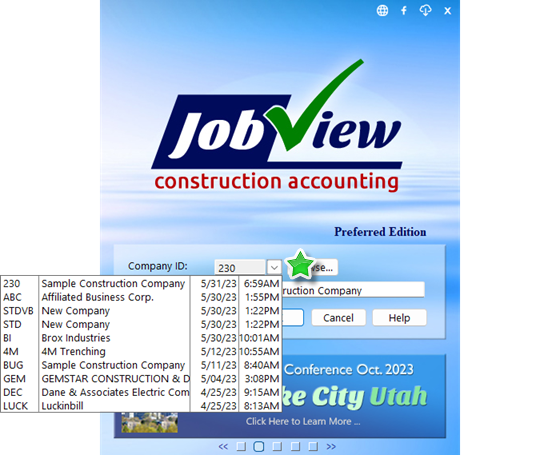
Select a recently used company from a new drop-down list in the Login window
- On the JobView Login window, the user can now select from a drop-down list of companies they have recently logged into.
- When the Social Security Number is entered for a new employee, JobView will check for a duplicate SSN in other employee records.
- A new utility now enables “quick editing” of the Time Off Available numbers for many employees.
- When viewing a historical pay period through Employee Entry on the History tab, the user can now view all information for every timesheet detail line item.
- In the Select Invoices for Payment window, job invoices now display the Job ID AND the Cost Code.
- On the Invoice History tab in Vendor Entry, the list of invoices now gives an indication if there were multiple payments made against the invoice.
- A new tab on the Update Contractor Draw window now displays a preview of what the printed Cover Sheet will look like.
- Aging and History reports now include counts of how many invoices and receipts are included on the listing.
|
- It is now possible to create a list of Default Cost Code Budgets that will automatically load when creating a new job.
- In Job Setup on the Certification tab, it is now possible to specify a different Job Name (different from the normal Job Name) to be printed on the Certification report.
- The Job Cost Detail Listing can now be filtered by Vendor.
- In Bank Statement Reconciliation, it is now possible to delete prior reconciliations.
- The Purchase Order Listing may now be filtered by "Reconciled With Pack Slip Status."
- Added "Will Call" as an option when selecting a Purchase Order Ship To Address.
- When setting up a piece of equipment, it is now possible to select an Operator Employee ID from the Employee List thus linking that employee to a piece of equipment. As a result, when entering a Usage Log for the piece of equipment, JobView will automatically fill the Employee field with the designated Operator Employee ID.
- When creating adjustments from a physical inventory recount, the user can manually specify the transaction date for the adjustments.
|
Version 22.1
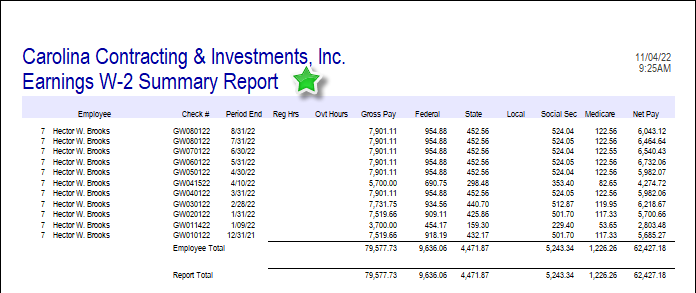
New W-2 Summary format for Earnings Detail Report
- There is a new format of the Earnings Detail Report available. This new “W-2 Summary” format shows just one row of information for each employee for each pay period. The columns included are the values that are needed to tie back the earnings detail to the printed W-2.
- When emailing W-2s, the system can now password protect the W-2 PDFs.
- Company name and address can now be printed on paycheck stubs.
- The user can now generate the Account Reconciliation (Positive Pay) file for payroll checks as well as accounts payable checks.
- The Account Reconciliation (Positive Pay) file can now be created at any time for any range of dates. For example, one positive pay file can be generated for all the checks printed today.
- When entering Invoices or Selecting Invoices for Payment, the window prompts now say “Handcheck or Debit Card.”
|
- The printed “Ready to Pay” listing now indicates the method of payment, Check, Credit Card, or EFT.
- A “Tax Exempt” flag has been added to the Customer Setup window.
- The user can now enter a Credit Card Fee in Receipts Entry.
- On the Receipts Entry browse, added a button that allows the user to generate Lien Release forms for the receipts being entered.
- When you finish a Bank Statement Reconciliation, the system now stores lists of not only which transactions that were reconciled, but also which transactions were outstanding.
- Added the “Contract Number” and “Customer PO Number” columns to the Job Setup Browse.
- The “Cost Code Listing” report can now be filtered by cost code Active status.
- When importing Jobs, user can now also include an identical set of cost code budgets on all the jobs imported.
|
New Features from Prior Versions:
Version 22.0
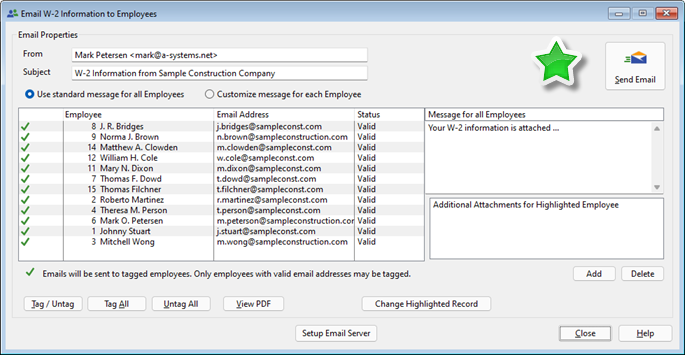
W-2 Information can now be Emailed to Employees
- When printing W-2 forms, you now have the option to email W-2 forms to employees.
- The user can now choose to omit voided transactions (Timesheets, AP Invoices, AR Billings) from browse windows and reports.
- In Timesheet Entry, you can now globally add a day of holiday pay for selected employees in one step.
- When viewing the details of a pay period from the Employee Entry History Tab, you can now see the checking account used and whether the paycheck has cleared the bank.
- All Payroll Union reports now have the option of including readability bars.
- The employee entry browse window can now be sorted by Pay Type.
- Added the ability to reconcile an AP Subcontract Invoice with the new “Subcontract Commitment” purchase order type.
- Added a new format for the Job Cost Analysis Report called the “Subcontract Commitments” report. It reports the amounts entered in the new Subcontract Commitment purchase order type.
|
- Notes entered in Job Setup now have a new optional message reminder type. The note can tell the system to put a red flag icon next to this job on the Job Setup browse window.
- Added color coding to the cost codes listed on the Budgets tab in Job Setup. Cost codes are listed in RED when the cost to date is over budget. User Conference Suggestion.
- Added the ability to import VIN number when importing equipment.
- Added a list of job Receipts to the AR Billings tab of the Job Overview window.
- On the Accounting Overview, new buttons have been added that will create an automatic GL Adjustment to bring the GL Account Balance into agreement with the Subsidiary Ledger balance.
- New special settings have been added to the Purge History window when purging AP or AR detail. You can now instruct the program to purge invoices even if they are still listed as Open. You can also have it purge transactions charged to jobs that are still Open.
- A new utility has been added that will recalculate the Amount Paid to each vendor for all years.
- A new utility has been added that will recalculate the Current Balance figure for all customers.
|
Version 21.1
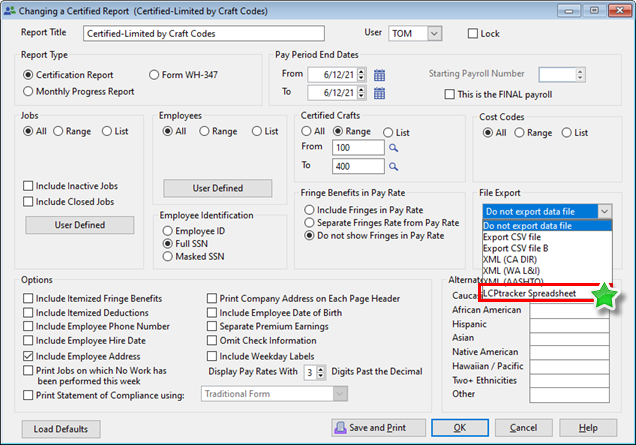
Certified Report information can now be exported to a Spreadsheet for use by LCPTracker
- The Certification Report can now be exported to a spreadsheet in a format to be used in LCPtracker.
- When the Certified Report is previewed, the pdf now includes the Certification and Statement of Compliance.
- When printing PR Quarter End Reports, a new option allows exporting an upload file containing information for the California DE-7 Form.
- When an employee is selected on the Timesheet Entry window, that employee's name will appear as a hyperlink. When that link is clicked, pertinent employee information is displayed, including the number of Vacation/Sick hours that are available.
- A Job Setup Note can now be included on the printed Progress Billing form.
- A View button has been added to the Email Statements window. This new button allows the PDF of the Statement for that customer to be previewed.
- On the AR Tax Summary report, it is now possible to exclude taxes on Progress Billings.
- When a Trade Invoice is created from a Contractor Draw, the printed trade invoice now has columns for Contract Amount (Scheduled Value), Current Percent Billed, Prior Percent Billed, and Total Percent Billed.
|
- When reconciling an Accounts Payable Invoice to a Purchase Order, the text line items from the Purchase Order now are included in the reconciliation window.
- The Quantity field in AP Invoice line items has been modified to hold three digits past the decimal.
- The IRS 1099-NEC Form now prints three to a page.
- A new "Tax Exempt" flag is available in Job Setup.
- The Job Listing report can now be sorted by Customer ID or by Customer Name.
- The Transaction Report and Detail By Account Reports can now be “filtered by user” showing who posted the transaction.
- A new column for Quantity Available (Quantity On Hand - Quantity Committed) has been added to the Inventory Stock Status, Item Reorder, and Item Master Listing Reports.
- Filters have been added to the Inventory History report limit window for Customers and Vendors.
- A User Limit and Date Range Limit have been added to the Utilities > View Activity Log window.
|
Version 21.0
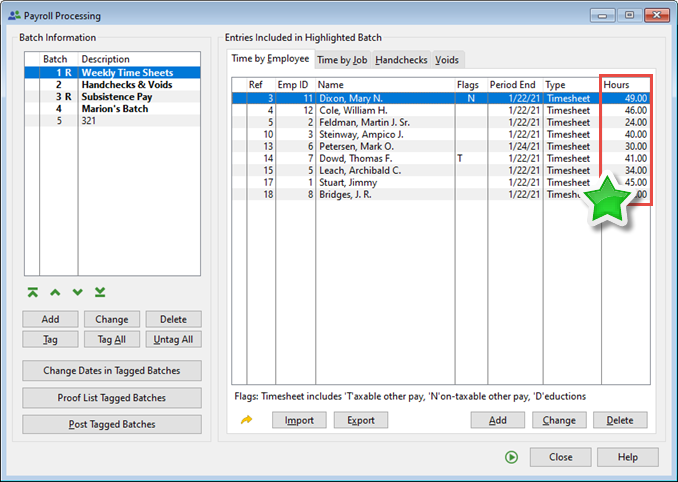
Timesheet Entry Browse now includes a column for Total Hours Entered
- When adding a new timesheet, the employee can be picked by typing the employee External ID in the employee number field.
- The Earnings Detail report can now include a “Summary by Pay Type,” which lists totals for regular pay, other pay, salary pay, etc.
- A new setting for the Employee Listing report allows the user to limit the report to show only employees with wages in a specified year.
- The list of timesheets in Timesheet Entry by Job can now be sorted by clicking on column headings.
- In the Customer Entry window on the History tab, a new tab has been added showing historical cash register receipts for this customer.
- On the printed Progress Billing, the Job Address has now been added in the upper right-hand corner.
- When Change Orders are itemized on the Progress Billing form, the system can now show how much has been billed on each change order.
- On the 1099 printing window, a Golden Arrow button was added for exporting the list box information.
- A new option in Accounts Payable Setup allows the user to specify the “Default 1099 Setting for New Vendors.”
|
- Date fields on the Job Cost Analysis Report limit window are now spin boxes with calendar lookup buttons.
- On the Job Site tab in the Job Setup window, the user can now duplicate the Customer address information into the “Owner” fields.
- The Job Cost Analysis Report, Cost & Revenue by Billing Phase format can now be filtered by Group Code.
- In GL Transaction Entry, when a transaction is charged to a cost code with a “B” cost type, the user now has the option of specifying whether this is Regular or Overtime.
- When Entering GL Accounts, the user can now select what type of account it is. (i.e. Fixed Asset, Current Liability, etc.)
- When doing an advanced search on the Item Price File Browse window, the user can now type multiple keywords and return only items that match all the entered keywords.
- The user can now enter descriptions for the different pricing levels in the Item Price file.
- When an Inactive item is selected from the Item Price File browse window, the user is now warned that the item is Inactive and asked if they wish to continue.
|
Version 20.1
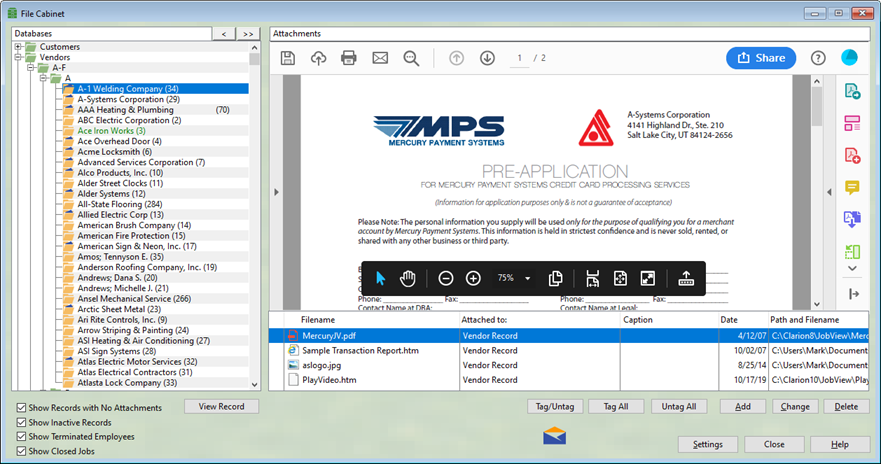
The File Cabinet window will now preview PDF files
- A new “Open” button was added to all of the Attachment tabs throughout JobView. An Attachment may be immediately reviewed by clicking on the Open button or clicking directly on the image.
- A new option allows checks to be sent to a different printer.
- The Earnings Detail report now has the option of including a weekly count of Full Time employees (30+ hours), and the number of Part Time employees. This may be useful in PPP reporting.
- On the Paycheck Printing screen, the list of checks to be printed now includes new columns that show the projected check number and net pay amount.
- The IRS Form 941 (from 2nd quarter of 2020 on) was updated to reflect the latest revision by the IRS.
- A new column on the printed Deposit Ticket shows which invoice each receipt was applied to.
- In the Vendor E ntry History tab, it is now possible to click on an open invoice and select that Invoice for payment and then immediately print the check.
- The new 1099-NEC IRS form (for Non-Employee Compensation) was added. This is now the default form for reporting amounts paid to vendors.
|
- A new Quantity field was added to the main Change Order Entry window. When this change order is added to a draw, the estimated quantity will be updated.
- When editing a GL Account, the user now has the option to jump to a Check Register (if it is a checking account) or the "View Detail by Account" window, showing all the transactions to this account for any desired fiscal period.
- An Employee Limit has been added to the Job Cost Detail report limit window.
- When a Financial Statement is printed, the existing checkbox to Warn of Unassigned GL Accounts , will now print the balances in any such accounts too. This is a convenience in quickly seeing why a Balance Sheet may not balance.
- In DataView, the list of available fields for a view can now be sorted alphabetically.
- The preformatted FormMaker for Accounts Receivable Invoices now allows the printing of the "Past Due" stamp.
|
Version 20.0
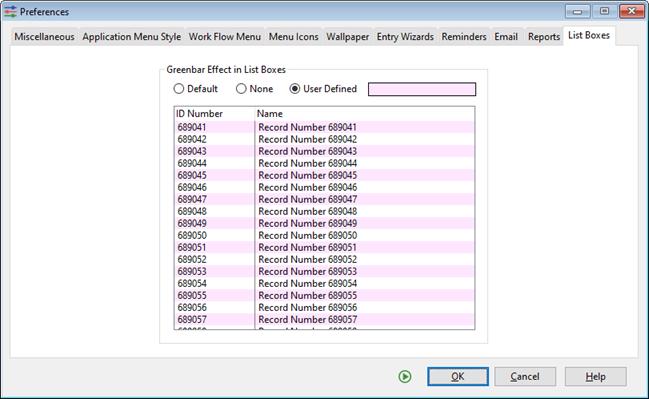
User can now select their preferred color for list box shading
- The user can now choose their own preferred color for the greenbar style list box highlighting throughout the system.
- In Setup > Preferences, each user now has the option to turn audible warnings on or off.
- All FormMaker report preview windows now allow for generating PDF.
- A new "Cash Management Overview" link is now included in the A/R and A/P sections of the Company Overview window. These lead to a window showing expected cash in from A/R and expected cash out from A/P, with a cash projection summary at the bottom.
- A Multi-Company Financial Statement layout can now be created by clicking a button to duplicate an existing single company financial statement.
- When printing the A/P Posted Invoice Analysis Report in the Standard format, the user can now elect to exclude the Vendor Aging section, making the report more readable.
- The system can now issue a warning or disallow a person from posting invoices with invoice dates that are not within the posting fiscal period date range.
|
- In the Employee Entry window, the user can now enter information from the new 2020 W-4 form. The Timesheet Posting program will correctly use the new W-4 information to calculate federal tax withholdings. This includes the option to use the new federal Head of Household withholding table, and employee-provided exemption, other income, and total deduction figures.
- In the Payroll Certification Report printing limit window, the user can now request an XML file formatted to fit AASHTO requirements.
- In the Job Summary report Cost vs Billing Summary, the user now has two options for calculating Gross Profit Percent (GP %).
- Added the ability to store "Owner Information," including the owner name and address, to the Job Setup window.
- Added the new "Owner Information" section of Job Setup to the Job Listing report.
- Added new report filters for Salesman, Foreman and Estimator to all Job Costing report limit windows.
|
Version 19.1
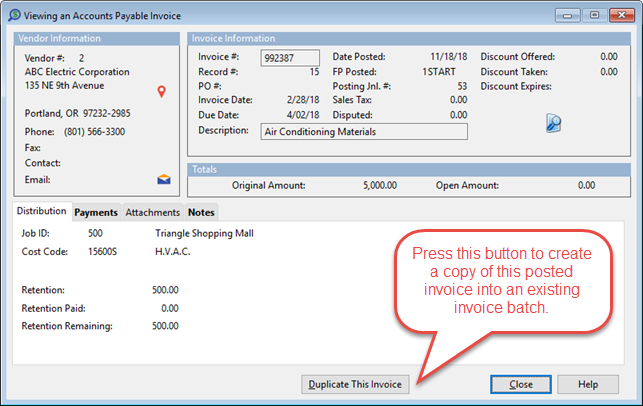
New ability to create an unposted copy of any posted invoice in Accounts Payable
- When viewing a posted AP Invoice, the user can now click a button to Duplicate the invoice as an unposted invoice in an existing batch.
- The Accounts Payable Check Register now includes the Invoice Date as well as the Invoice Number.
- When posting AP Checks, the Check Register is now printed before the GL Summary of Check Posting.
- An option titled “Mask Quantities” has been added to the limit windows for printing Job Cost Analysis and Detail reports. This allows the user to instruct the report to not print quantities to-date on cost codes that have no quantity budget.
- When you email a Contractor Draw Request, the system now uses the same settings used for emailing invoices. It fills in the email address and the subject line, and attaches the PDF version of the draw request.
- When Accounts Receivable invoices are imported into a batch, the system will now notify the user if the imported invoice will push the customer over their credit limit.
- In the Reconcile Posted Receipts browse window, a new column titled “Customer Balance ” lets the user see at a glance if there are sufficient invoices to reconcile against so they don’t need to double click on each one.
|
- The checkbox in Receipts Entry for automatically distributing received amounts to invoices has been moved from the Receipts Entry browse window into the settings for each individual receipt batch. Now, different batches can have a different setting for distributing received amounts.
- The system now generates individual PDF documents for each direct deposit voucher during check printing.
- The Earnings Detail report now has a limit to include or exclude the new Time Off section of the report.
- When importing timesheets, the system can now convert hours over 40 per week to overtime, even when importing two weeks’ worth of time.
- The Payroll Check Register now shows detailed taxes (including Social Security and Medicare). User Conference Suggestion
- In the Fiscal Period browse window, you can now tag multiple fiscal periods and push a button to close all the tagged periods at the same time. User Conference Suggestion
- The Chart of Accounts Listing now includes account Notes.
|
Version 19.0
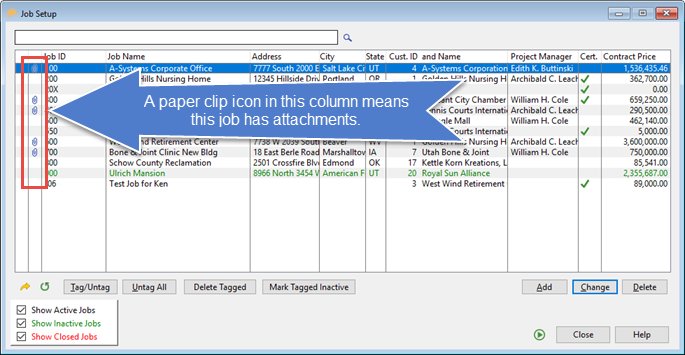
New Attachments column on many list boxes. A paper clip icon indicates that the record has attachments.
- The system can now remember the column configuration of list boxes in the system. If the user stretches or shrinks the width of any column, the program will present that same column size when the window is reopened. A new green recycle icon is shown at the bottom of list boxes where this feature has been added. Clicking the recycle icon resets the column widths to the default.
- The program can now remember the location and size of windows. When a window is moved then closed, when it is reopened it will be in the new location.
- Both the above features can be turned on and off using a checkbox titled "Preserve Window Locations & Sizes and List Box Column Widths" in the Setup > Preferences menu item.
- All the Payroll setup options have been combined into one window, accessed from the Setup > Accounting Options > Payroll menu item or by right-clicking on the Payroll main menu button.
- The Void Invoices/Receipts window in Accounts Receivable now has buttons titled "Limit Invoices" and "Limit Receipts." Using these buttons the user can filter the list of invoices or receipts to be more manageable.
|
- The Vendor Type selection in Vendor Entry on the Miscellaneous tab has been expanded. The user can now designate this vendor as a Vendor, a Subcontractor, or an Employee.
- When an Owner Change Order, Subcontract Change Order, or Subcontract preview is Exported and opened as an Excel spreadsheet, the spreadsheet is formatted nicely to look like the printed document.
- When printing the Job Cost Detail Listing, the system now prints the entire detail description entered in Accounts Payable Trade Invoice entry window on the Line Item Detail tab.
- A new dropdown list box for "Estimator" has been added to the Job Setup Notes tab.
- When entering an Approved Change Order and the Job is set so that change orders can be applied to individual Billing Phases, there is now an option to assign each change order line item to a different Billing Phase.
- Add the "Send List Contents To" (Golden Arrow) button to the new G/L Summary window (transactions in context).
- The system now gives the user the option to store vendor pricing when entering a Purchase Order Line Item. For example, a message now pops up asking if the user wants to save a price of $1.58 per SF for Item #KKD234 for Vendor #45.
- A utility has been added allowing two Inventory Items to be merged into one.
|
Version 18.1
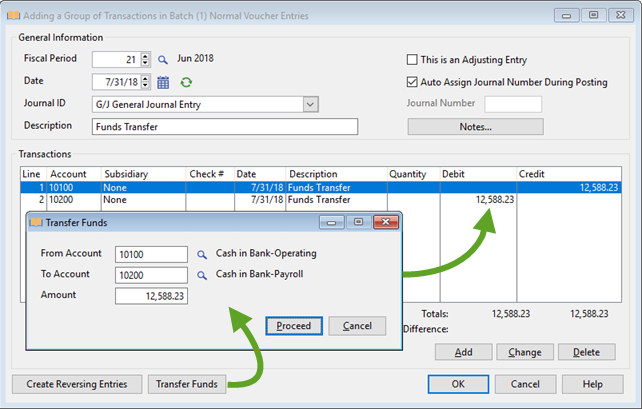
New Transfer Funds button in Transaction Entry allows user to create a simple Debit/Credit set in one step
- Attachment list boxes now include a Date column next to the Description and Type columns so that the user can sort the attachments by date.
- The user can now modify a global setting, so that when selecting an ID for a new vendor or customer, the system will either default to the next available number (higher than the highest existing number) or search for and find the first unused number.
- Added the ability to change a date by typing any of these keystrokes:
+ |
Advance to next day |
– |
Previous day |
T |
Today |
W |
First day of week |
K |
Last day of week |
M |
First day of the month |
H |
Last day of the month |
Y |
First day of the year |
[ |
Same day in previous week |
] |
Same day in next week |
; |
Same date last month |
' |
Same date next month |
|
- Logging into a new company has been streamlined. If the company you are switching to has your same User ID and password, the login skips the User ID and Password screen.
- Redesigned the list boxes in timesheet entry that show entered hours and distribution so that they are more easily readable.
- Added Time Off accruals to the timesheet posting reports and to the Earnings Detail report.
- The user can now attach additional items to voucher emails.
- In transaction batch entry, a new “Transfer Funds” procedure asks the user for an amount and an account from and to and automatically creates a group of transactions.
- Added the ability to click on any GL Transaction and see the transaction “In Context,” showing the entire posting the transaction came from.
- A new Accounts Receivable setting lets the user determine whether or not to print the letter “T” on taxable line items on printed invoices.
- Added the Sales Tax Percentage to the printed A/R invoice.
- Added a new flag for “In Compliance” for all the different vendor insurance types.
- JC Analysis reports now have a limit that excludes line items where the budget is zero.
- On the printed Field Report Worksheet, the user can now include a “Completion Date.” This is the date by which the project manager should return the completed form to the accounting department.
- When printing Equipment Costing reports the user can now use the “All / Range / List” style filter for setting Equipment ID and Cost Category limits.
|
Version 18.0
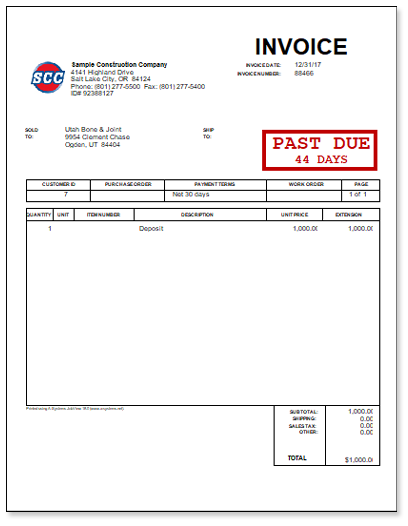
Re-printed Invoice with Past-Due Stamp
- When printing Customer Statements or Re-Printing Invoices, the user now has the option to include a “Past Due” stamp on the printed report.
- Dates are now displayed as 03/08/18 instead of 3/8/18 to improve screen and report readability.
- The user can now check a box to instruct the system to preview printed checks.
- Added label printing to the Job Listing report.
- When the user forces a job to the "Completed" status on the bonding report, the system now prints the current “Cost to Date” figure in the “Projected Cost” field, forcing the completion percentage to 100%.
- The A/P Posted Invoice Analysis report can now be filtered to exclude inactive vendors.
- Added a Recalculate button to the "Miscellaneous" tab in vendor entry. This button will recalculate the 1099 Amount Paid.
- The user can now choose to include or exclude inactive assets on the Fixed Asset Listing.
- Added the option to print all companies on one page in the Multi-Company Financial Statement printing program.
- Added the ability to include Sales Tax Codes in A/R Progress Billing entry.
|
- The AR Sales Tax Report now has headers on every page of the report, the option to print readability bars, and the option to filter the report by Invoice Date AND by Paid Date.
- The Timesheet Proof Listing now includes equipment usage when the Include Equipment checkbox is checked.
- The Certified Craft Code browse window now includes a Golden Arrow button so the contents of the window can be printed or exported.
- Added a brand new Vacation Paid Report.
- When printing W-2's, the user can now opt to include Section 125 deduction amounts in box 14.
- State SDI amounts are now included in W-2 box 14 instead of in the Local Tax fields.
- Added the option to split out Regular and Overtime hours on the Workers Compensation Audit Report by Employee.
- The Physical Description field from the Equipment Entry window is now displayed as a colum in the Equipment browse window.
- Added a report that shows detail of equipment usage charged to jobs.
- Added new fields for Make, Model and Year to the Equipment file.
|
Version 17.1
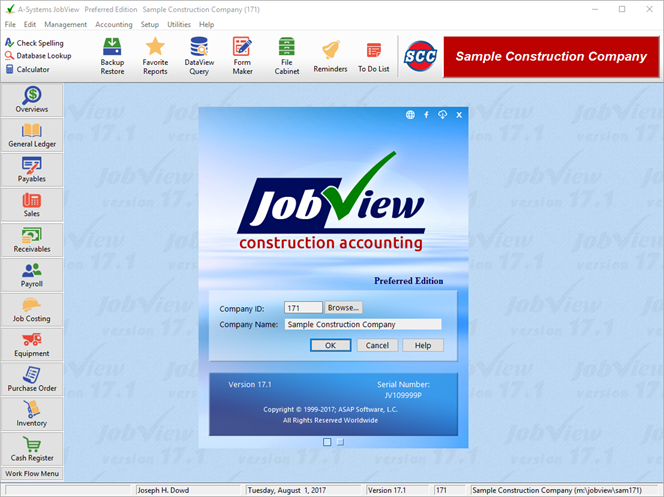
New JobView Logo and Program Icons
- New icons throughout the system.
- Added a button to allow installing updates from the Login window.
- The user now has the option to use A-Systems’ email server in email setup.
- Added the option to set up an Auto Job Billing job with NO billing phases, just one set of markups by cost type.
- On the new job cost analysis Cost by Billing Phase report, added a new section for cost codes not assigned to any phase.
- Added the ability for user to exclude "Internal" change orders from the change order section of the analysis reports, keeping them in the Base Costs instead.
- Added an “Open Retention” column to the AP Overview Browse Vendors by Aging Period.
- The Expirations tab in Vendor entry now includes checkboxes for “Additional Insured” and “Waiver of Subrogation” endorsements.
- Added buttons on the Payment Selection browse to place or remove a payment hold.
- Added a new token called [StartDate] to financial statement design, this code will print the first day of the first fiscal period in the range.
- Added an option in the Transaction Listing limit window to subtotal Credits & Debits by Journal Number.
|
- When importing GL Transactions, the system now recognizes numbers in parentheses as being credits.
- Added the ability to remember the date of the current draw application.
- On the History tab in Customer Entry, added column totals for all the columns.
- Added the option to place Sales Tax on AR Progress Billings.
- Added ability to export Certification Report in xml format for California DIR upload.
- Reorganized the Messages section of the payroll check stub to be able to see more message information.
- Created a new capability in vacation accrual, allowing the user to set a hard limit for the number of hours an employee can accrue per year.
- Handcheck Entry now allows for retrieving and paying employee commissions.
- In the financial statement overview, the GL Transaction Description now matches the description we show on transaction reports.
- On the Job Cost Overview, we added a column for Last Date Invoiced/Billed.
- A new column has been added to the Billings tab of the Job Overview window that shows the first attached invoice note.
- Added a Transaction Detail list box to the Budget & Costs tab of the Job Overview.
- Added the ability to set a range of fiscal periods in the Job Cost tab of the Balance Back Overview.
|
Version 17.0
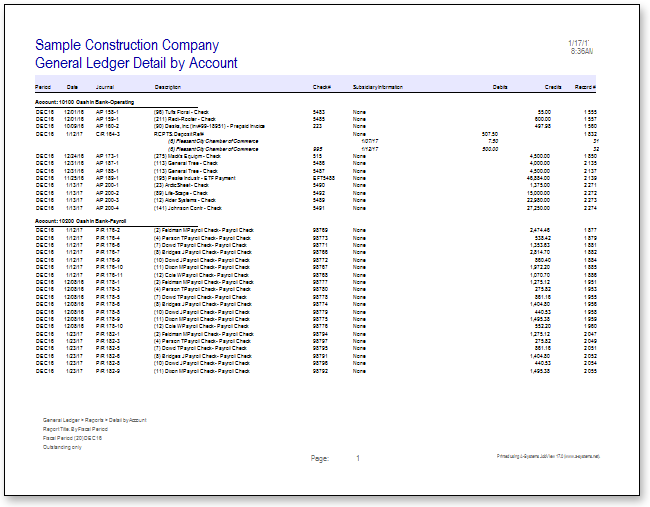
Color scheme can now be added to standard system reports
- It is now possible to add colored header lines to all reports.
- Commas have been added to all numeric fields on reports.
- All “Insert” buttons have been renamed “Add” buttons.
- The Company ID has been added to the main title bar and the status bar at the bottom of the window.
- A new system setting allows job costs to be charged either to the “Base” budget or directly to a “Change Order.”
- The Complete Job Cost Analysis report can now print Change Orders in a separate section. The report will include a Subtotal for Base Costs, and a Subtotal for all Change Orders
- A new estimated completion cost method has been added. This method is called “User enters extra anticipated costs.”
- A new Job Cost Detail Listing format has been added titled “Job Cost & Billing Detail.” This report sorts cost detail by Base Costs versus Change Orders, then by Cost Code. There are separate columns for each cost type and a column for Billings.
- The Auto Job Billing setup now has a Billing Craft table that specifies how much per hour the Auto Job Billing will charge for each craft in the table. During the Auto Job Billing process, JobView will look up the employee's Billing Craft Code and use the billing rate from that craft code in this job's Billing Craft table.
|
- An Invoice may be selected for multiple partial payments in the same check run.
- JobView now prints on QuickBooks check stock (format 9029), for those with a supply of those checks.
- The printed Financial Statement now has more logical indentation of the heading and totaling lines.
- The GL Check Register screen may be viewed in a format that looks like a “traditional” check register by clicking a new button found on the Print Check Register report browse window.
- It is now possible to “tag” multiple jobs in the Draw Request browse window and print a Draw Request for multiple jobs at the same time.
- The Invoice Number is now printed on the Draw Request Cover Sheet.
- On the History tab in Customer Entry, a new section has been added for Lien Releases. It is now possible to create, print, and track Lien Release Forms to customers.
- It is now possible to designate separate accounts for Vacation, Sick Pay, and Pension. This allows the use of different accounts to track accruals for different classes of employees (e.g. office people and field people).
- In Timesheet Entry, Detail Line Items charged to jobs now display the Job Name and Cost Code Description in their list boxes.
|
Version 16.1
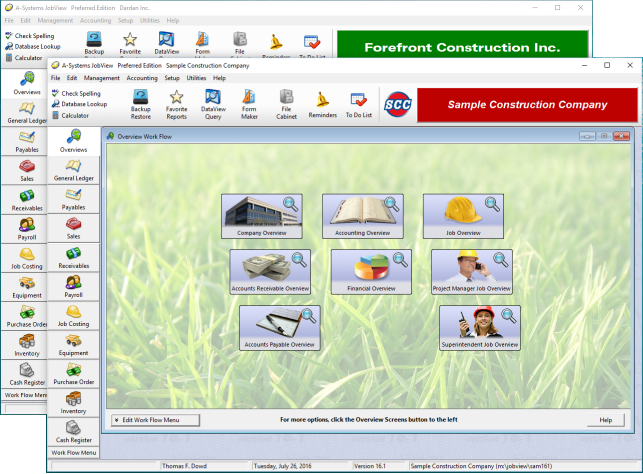
Multiple Copies of the program can now be opened at the same time
- Multiple instances of JobView may now be opened on the same computer.
- The Invoice History tab in Vendor Entry now includes a Void Check button, a Void Invoice- button, and a Print Lien Waiver button. This allows these tasks to be performed from within the Vendor Entry procedure.
- In Payment Selection, new Payment Status Icons now indicate which invoices have been selected for payment, and what payment method was chosen.
- There is a new-Print Envelope button on the GL Instant Check entry window.
- When setting up Draw Request line items, it is now possible to include markups (like the ones used in setting up Auto Job Billing line items). This allows the calculation of Work Completed amount for each line item based on actual costs + the markup.The Continuation Sheet tab in Draw Requests now shows the Total Percent Billed at the bottom of the Scheduled Values list box.
- It is now possible to print the Schedule of Values on a Continuation Sheet without Billing Numbers, just the Contract Values.
|
- It is now possible to reprint a prior Draw Request from the AR Invoice Overview window, accessible through the AR Overviews and through the Customer Entry Invoice History tab.
- Contract Amount, Billed to Date, and Percent Billed columns have been added to the Contractor Draw and Auto Job Billing browse windows.
- A new option allows the masking of Social Security numbers, so they are not printed on Health Coverage Reporting forms (1094 and 1095).
- It is now possible to indicate whether an expired employee document will trigger a warning message during Timesheet Entry.
- In Purchase Order Setup, a new setting makes it optional to have the warning for potential over-budget situations displayed during P/O Detail entry.
- Vacation, Sick Pay and Pension accrual descriptions and limits can now be added to the DataView Employee Listing.
|
Version 16.0
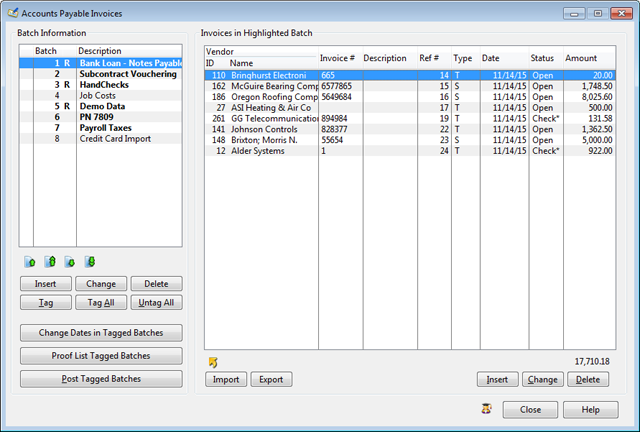
New Greenbar-Shading Effect in on-screen list boxes
- A new “greenbar-shading” effect was added to all list boxes to make them easier to read when longer lists are displayed.
- “Posting notifications” now work with the System Tray icon. If JobView is minimized on your computer and another user attempts to post, a bubble will pop up in the system tray, informing you of the pending posting. When you maximize JobView, that the full warning window will appear on your screen.
- When opening the Accounting Overview (Balance Back Overview,) JobView now asks for the Desired Fiscal Period before calculating and displaying the numbers.
- The DataView Employee Listing now has the option to print the Date of the employee's last raise.
- The Job Setup browse window automatically limits what is displayed to jobs for which the user is a either the Project Manager or Superintendent.
- The AP Check Printing window has been redesigned so that Handwritten Checks that are ready to be posted now show up in their own list box.
|
- Additional MICR-style check formats have been added which allows for printing the check in the middle or on the bottom.
- Two new print settings / adjustments have been added that allow for printing AP Checks at “Lowest and “Highest” settings.
- When selecting a Customer Number during Miscellaneous Receipts Entry, JobView gives a warning if there are any Open Invoices for the customer. That warning also dislays a list of those invoices, greatly speeding up the process.
- When inserting a Job Billing, JobView now auto-populates the Sales Rep field with the Salesman entered in Job Setup.
- Social Security Number may now be “masked” on printed EEO Utilization Reports.
- When the Delete button is pressed on the Purchase Order Browse window, JobView asks whether the highlighted Purchase Order or the tagged Purchase Orders are to be deleted.
|
Version 15.1
 Play New Features Video
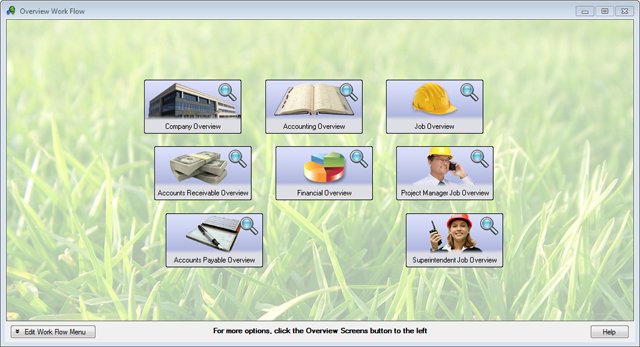
New Work Flow Menu Tile Images
- A “Save and Print” button was added to all Report Limit Edit windows. This allows users to click the OK button to automatically save the current limits when printing a report from a browse window.
- The “Organizing Files” now runs in the background, making a daily safety backup during logout. While this is a convenience, please do not turn your computer off while it is making a backup.
- When printing Job Cost reports that include unposted transactions in AP & PR batches, a new option allows the exclusion of Repeating Batches.
- A new report was added that prints Equipment Usage by Job.
- Draw Requests now have the option to attach Change Orders to Individual Billing Phases.
- There is a new option to email “The check is in the mail,” notifications to vendors. These emails are sent directly after a check run to any or all the vendors paid during the check run.
|
- Readability Bars were added as an option to all Accounts Payable and Accounts Receivable Reports.
- When posting a Draw Request, a new option allows the selection of which Stored Materials are to be transferred to Prior Billings. Previously, all Stored Materials were transferred to Prior Billings each time a Draw Request was posted.
- When entering a Miscellaneous Receipt, the Account Description is now displayed next to the selected Account Number. An “Earnings History by Year” option was added to Employee Listing report limit.
- Added a menu item on the Payroll Payments menu allows direct access to Email Direct Deposit Vouchers, instead of going through the View Postings and Backups window.
- The Purchase Order Entry window was modified to increase its speed.
|
Version 15.0
Play New Features Video
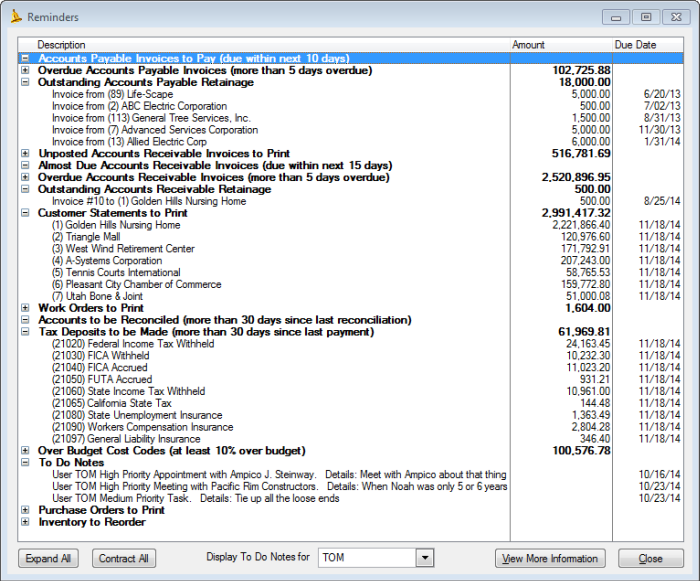
New Reminders Window
- New To-do List system lets individual users create to-do items and mark them off as they are completed.
- Added a series of Reminders for various portions of the system. The user can set up which reminders will show up (including to-do list items), and at what level of detail.
- When printing notes, the user can tag the notes to be printed or filter the notes to be printed by date.
- The user can now determine the display order of the menu icons on the main icon bar in Setup > Preferences.
- When looking up budgets, the Current Budget and Cost to Date figures are displayed.
- A new tab for Purchase Order history has been added to the Vendor Entry window.
- Notes can be added to an AR Invoice added after the invoice has already been issued. For example, the user may add collection notes to an invoice and reprint it.
|
- Printing W-2 forms and generating electronic W-2 submission file can now be done in one step.
- When printing employee history, the user can tag the history entries to be printed or filter the history entries to be printed by date.
- The system now saves the User ID of the current user for all payroll history entries.
- The user can press a new button to print the Financial Statement during Financial Statement Design.
- PDFs of checks paid to Employees and Vendors are now included in the File Cabinet.
- The user can indicate whether the File Cabinet should be opened with all drawers initially expanded.
- The window for Equipment setup has been combined with the window for entering Fixed Assets.
|
Version 14.2
Play New Features Video
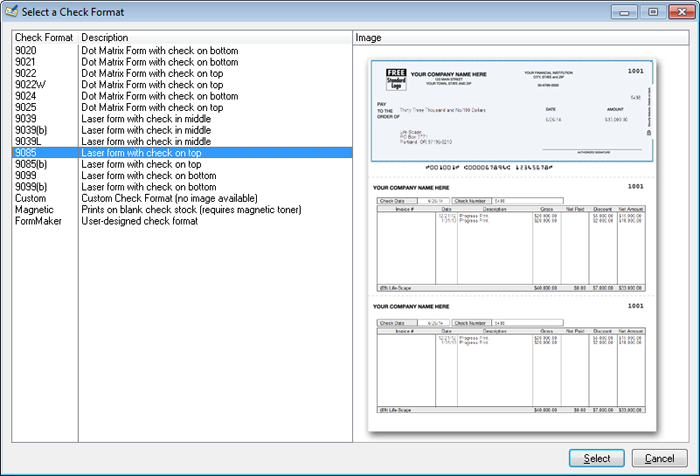
View thumbnail images of printed checks while selecting the desired check format
- You can now assign a different AP and Payroll check format for each GL Checking Account. User Conference Suggestion.
- On GL Posted Transaction and Detail By Account listings, the user can now specify whether to wrap long transaction description lines.
- Added ability to import pre-paid Accounts Payable and Accounts Receivable Invoices.
- When creating a new vendor by copying from the Employee file, the vendor name is now created with a semicolon for sorting purposes (e.g. Hanson; Jason Keene).
- Added a FormMaker (user-definable) version of the Draw Cover Sheet.
- When emailing a Price Quote, Sales Order or Invoice from the Print Preview, if the customer has multiple contact names with email addresses, the program lets you pick one or more contacts to whom the document should be emailed.
- When emailing a Purchase Order from the Print Preview, if the vendor has multiple contact names with email addresses, the program lets you pick one or more contacts to whom the purchase order should be emailed.
|
- Added the ability to perform a mass update for raises for union employees. Now you don’t have to go into individual employees to change pay rate.
- On the Earnings Detail Report, added the option to print each employee on a separate page.
- When you turn off Direct Deposit for an employee, the system gives you the option of also turning off any direct deposit deductions.
- Added new columns to Job Setup list box for Contract Amount and Certified Job.
- When the user adds a new budget line item or changes the values of an existing one, the User Activity Log receives an entry detailing the changes.
- Added the ability to apply ALL equipment categories in the dictionary to ALL pieces of equipment.
- Receipts can now be reprinted from the Receipts Overview window.
- In the File Cabinet, on the Attachment Browse list, added the ability to sort attachments by clicking on column headers. Also added a Date column.
|
Version 14.1
Play New Features Video
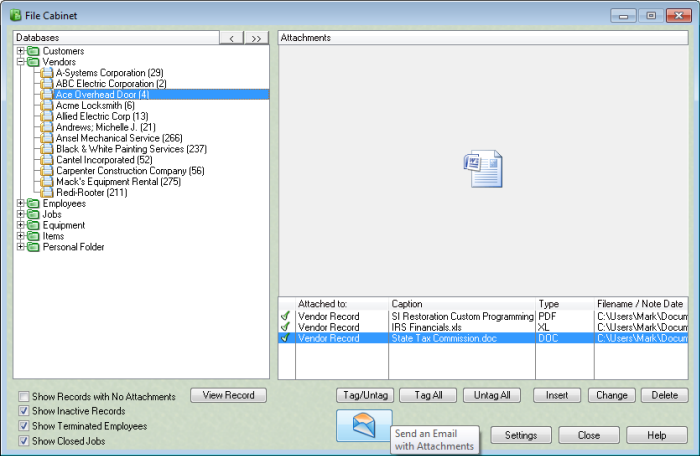
Send an email with selected documents from an entity (Vendor, Customer, Employe etc.) attached
- A new Quick Entry window for setting up Cost Code Budgets allows the quick entry of many Budget Line Items in a row.
- The option to print AP and AR History reports By Job was added to the Job Costing Universal Report.
- Reports in the Job Costing Universal Report may now be manually sorted.
- The Payment Selection screen now displays invoices with Totals at the bottom of the numeric columns.
- The Payment Selection screen now displays invoices with Totals at the bottom of the numeric columns.
- Each Scheduled Value line item in the Contractor Draw program now includes an icon that indicates whether the line item has been billed.
- When printing Draw documents, a new option allows printing zero amounts as “0.00” or as blanks.
- Draw document can now be printed showing either Customer 1 or Customer 2 from Job Setup, listed as “Owner.”
|
- The Detail by Account report now has the option of having a Running Total column
or Debit and Credit columns.
- The ability to Shift-Click to select a range of transactions was added to Bank Statement Reconciliation.
- An additional Email field was added to the employee file.
- The Employee Emergency Contact has new fields for Relationship and two Phone Numbers.
- A blank OSHA Form 301 form may now be printed.
- A blank Purchase Order form may now be printed. In addition, there is an option to print it with an Assigned PO number.
- All batches now have a user-defined setting for “Repetitive Insert.” This option allows the user to indicate whether a new entry window will be displayed after each entry.
- A new function allows filtering the new Email Log by the sender's Email Address.
- Customer and Vendor additional contacts now have a Title field.
|
Version 14.0
Play New Features Video
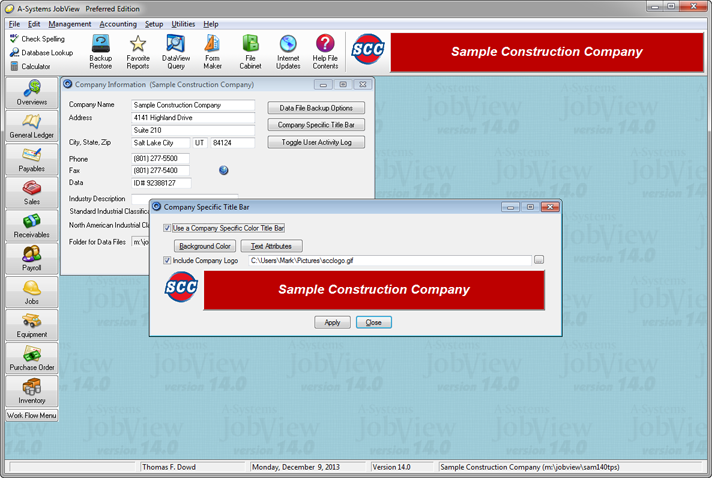
Apply your own Company Logo to the JobView Title Bar
- Added ability to place a Company Logo in the title bar.
- Added ability to move batches up/down.
- When the entry window asks for a Job ID, the user can now enter either the Job ID or the Job Name and the system will find the correct job.
- When user is attaching a Note to a Vendor, Customer or Employee record, they can flag the note to be a reminder window when entering Invoices, Payments, Receipts or Timesheets.
- Added ability to select a different background for the Work Flow Menu.
- Labels on Vendor, Customer or Employee Documents, Notes, and History Tabs change to a bold font if items are included in the list.
- A preformatted Cash Flow Statement was added in Financial Statement Printing options. It is set up (and modified) in Design Financials by selecting appropriate G/L accounts and assigning them to Cash Flow Categories. Initial accounts are automatically assigned, which may be modified, when the each company’s data is upgraded to 14.0.
|
- The Fixed Asset report now shows that an asset has been sold, reducing the Current Value report total to more accurately reflect the total value of all fixed assets.
- When adding a new Vendor, the system will allow you to use a Vendor ID that has been skipped in the past.
- The system now prints two separate 1096 forms if both 1099-Misc and 1099-Int forms were printed.
- A new function now allows Inactive Vendors to be marked as Inactive, subject to a user-defined cutoff date (a date after which there has been no activity.)
- When creating a job from a Price Quote or Sales Order, the computer now grabs the default next Job ID. It also uses the Description field as the Job Name.
- AR Statement now has another option for printing all invoices that are currently past due.
- Added the ability to password protect Direct Deposit Pay Voucher PDF files emailed to employees.
- The Customer Name can now be included on the Bonding Report.
- Job Cost Detail Listing can now break out regular, overtime & double time hours.
|
Version 12.0
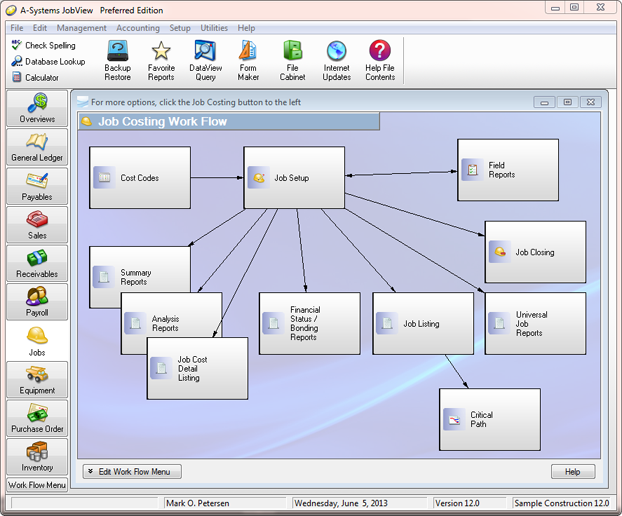
Newly designed JobView interface features larger icons and Work Flow Menus
- A new colorful splash screen / login window has been added.
- The icon bar and application menu icons are larger and easier to read.
- A new Work Flow Menu system allows users to build and customize an interactive work flow menu for each accounting module.
- Under the hood, the program has undergone substantial changes in preparation for future increases in speed of data access, data stability, and overall data accessibility.
- The "User Defined" Job Cost Analysis Report format now allows for exporting to Excel.
- Payroll > Payments > Reprint Check Stubs.
- The "Work in Process" Job Summary Report format now allows for additional lines for Month to Date Costs, Year to Date Costs, and Prior Years Costs.
|
- The AR History Report now has a means of excluding Retention Payment Invoices from the listing.
- The AR History Report now designates Miscellaneous Receipts with an abbreviation of 'MR'.
- When importing invoices into AP and AR, payment information can be imported, thus creating a pre-paid invoice.
- When you click the button to print a Deposit Ticket in Receipts Entry, you now have the option to print on blank paper or on a pre-printed deposit ticket form.
- When modifying email settings in the Setup > Accounting Options > Miscellaneous window, a test email can be immediately generated to test the settings.
|
Version 11.5
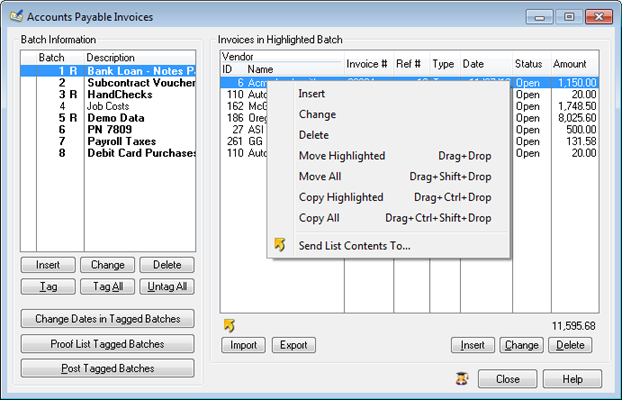
This right-click menu shows how user can now copy or move all transactions from one batch to another
- It is now possible to duplicate an entire batch using the drag and drop feature (Right-click on a Timesheet or Invoice to see a menu of drag and drop options).
- PDF copies of all Direct Deposit Vouchers are now stored. They may be emailed to employees any time after the Check Posting has been completed
- The Employee Browse window now shows which employees are set up for Direct Deposit.
- Any or all Pay Stubs may now be reprinted by individual, accessed from Payroll > Payments > Reprint Check Stubs.
- In Utilities > View Postings and Backups, the window now shows which Check Postings produced an ACH transfer file (Direct Deposits and EFT.) For those postings, it is now possible to view the ACH file or to Email Vouchers to employees or vendors.
|
- The Invoice List in Payment Selection displays a Lightning Bolt Icon for invoices from vendors that are set up for Electronic Funds Transfer (EFT).
- Routing Numbers for Deposit Tickets can now be set up to be different than the Routing Numbers on checks. This is set up in GL>Enter Accounts>Account Setup Tab>Edit Bank Information.
- When creating emails in the Invoice Printing and Statement Printing procedures, it is now possible to set up the Subject Line and Body Text.
- When importing Purchase Orders, each new purchase order is automatically assigned the next available Purchase Order Number.
- A Project Manager/Superintendent may now be designated as the “Main” one, useful if there is more than one on a job. Also, the Main Project Manager is now displayed in the List of Jobs on the Job Entry browse window.
|
Version 11.4
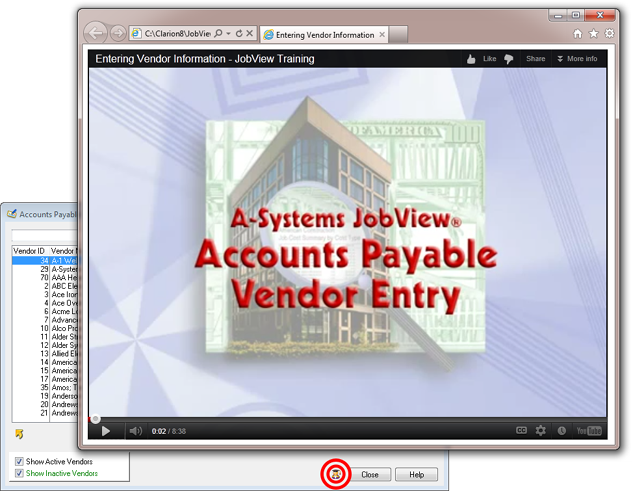
Training sessions are now hosted on the internet and can be accessed from within the system
- PR and AP Check Setup now have a setting for "Include Check Number on Check Face."
- Bank Routing Numbers entered during Direct Deposit Setup are now saved so that when a bank is selected for an employee's direct deposit or a vendor's EFT, the correct routing number will automatically be inserted.
- When dragging a timesheet from one batch to another, the Pay Period End Date will now change to match other timesheets in the destination batch.
- When printing Subcontract Change Orders, a new option allows the combination of all contract amounts from the same subcontractor on the same job into one contract amount.
- When entering a new vendor, names and address are checked for duplications.
|
- Contractor Draw requests may now be exported to a spreadsheet.
- Sales Order and Price Quote history tabs were added to Customer Entry.
- Inventory Pick tickets may now be auto-numbered.
- When inserting a Purchase Order Line Item, after entering the Quantity and the Amount, the Unit Price is calculated.
- In Transaction Entry, the Journal ID field is now a “drop down box” pre-filled with all the standard options and explanations of what they mean.
- User activity may now be tracked in greater detail.
- All batches can now be protected by User ID, allowing the contents of the batch to be hidden or inaccessible to other users.
|
Version 11.3
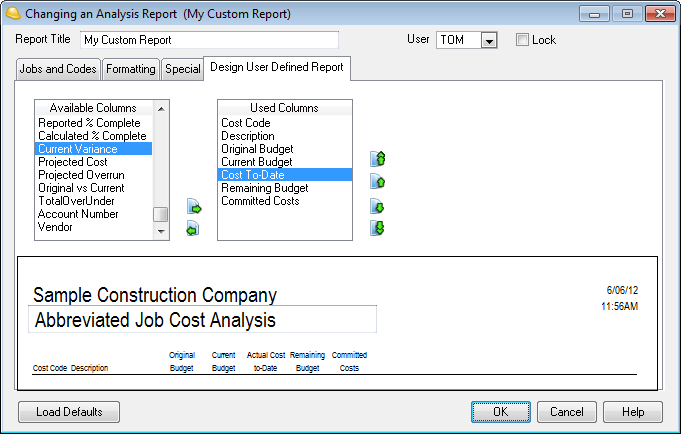
New Custom Job Cost Analysis Report format allows user to design their own report
- A new Job Cost Analysis Report format allows the choice of which columns are to be printed.
- The Job Cost Analysis Report now includes separate options for printing Extended Headers and Extended Footers.
- The Universal Job Report may now be set up to include a Range or List of Jobs.
- The Certified Payroll may now be printed on the official Certified Payroll Form: WH-347.
- An "About Time" interface was added to Timesheet Import.
|
- When viewing prior Bank Statement Reconciliations, a new option allows the printing of a list of Outstanding Transactions, including the option of printing such transactions on an “as of” date.
- All Auto-Fill field values may now be edited or deleted.
- The Manage Internet Updates window has been simplified.
- More fields were added to the Note Printing within DataView.
|
Version 11.2
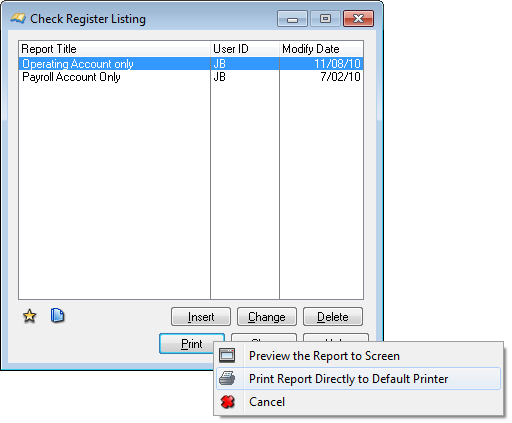
Right-Click on Any Print Button for Option to Send Report Directly to Printer
- All print buttons throughout the system can now be used to either create the usual Print Preview or to send the report directly to the printer, bypassing the Preview. Simply right-click on the Print button and the new option is resented.
- When emailing reports, a new option allows a user-specific signature block that was previously saved.
- When printing financial statements, there is a new option to enter a Range of fiscal periods for the "Compare to Prior Period" feature.
- You can now search for transactions by Date, Check Number, Description, Reference Number etc. in Bank Statement Reconciliation.
- Printing the Social Security Number on the paycheck may now be set on an employee-specific basis.
- A new option allows the printing of only the last 4 digits of the number.
- There are new options for paycheck messages, including a specific message for a specific employee and a message for all tagged employees.
|
- A new limit was added to all Job Costing reports, allowing the filtering to just jobs of a specific billing type.
- Job Cost reports now have a new limit that allows Committed Costs to be included in figures in the cost-to-date column figures.
- All Job Cost reports may now be color coded. Job Name information for Inactive jobs in Green and for Closed jobs in Red.
- When selecting AP Invoices for Payment, the user can click on one invoice then shift-click on another invoice. All the invoices listed between the two are then automatically selected for payment.
- The user can now enter a Default AP Sales Tax percent in AP Setup as well as in each Vendor Record so that it can automatically pop up in AP Invoice entry.
- Added the ability to click on an image in Maintain Item Price File and open the image in a separate window, so it may be zoomed in and seen in greater detail.
|
Version 11.1
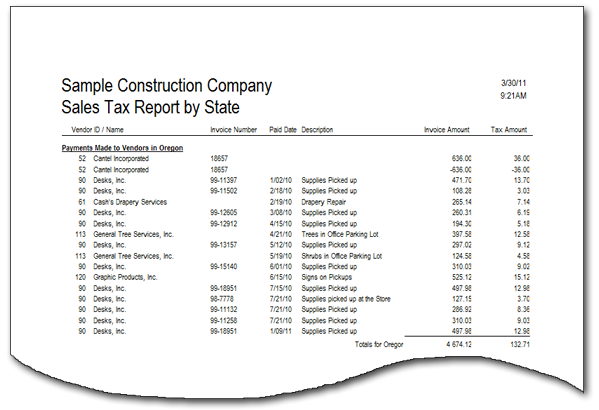
New Sales Tax Report by State
- New Sales Tax Report by State shows how much sales tax you have paid to all your vendors for a given period of time.
- Indicate a Default Invoice Pay Type (Open, Paid by Handcheck or Paid by Credit Card) for all new invoices entered from the vendor.
- Accounts Payable now stores Year to Date Paid amounts for all vendors for all years. You can now see how much you paid a vendor in 2007. This also eliminates the need for the AP Year End Balance Transfer procedure.
- Finance Charge Billings can now calculate Compound Interest.
- Greater user control of the invoice numbering on Contractor Draw billings.
- During Receipts Entry, the system can now print a Deposit Slip for the bank.
- General Ledger Year End Closing has been simplified, now requiring the entry of only one Fiscal Period.
|
- Payroll postings can now calculate social security at a separate rate for employer accrual and employee withholding.
- Federal unemployment can be calculated at a different rate for employee working in certain states.
- Earnings Detail Report can be filtered to include only earnings for a desired state.
- Purchase Order Listing reports can now be sorted by Job/Vendor and by Job/PO Number.
- DataView listings can have the original sort restored at the click of a button.
- DataView listings can now include up to 20 numeric fields and up to 20 alphanumeric fields.
- User Defined fields have been expanded to 40 characters and 15 fields.
- File Folder Labels can be printed in employee, vendor, and customer listing programs.
- User can now selectively restore certain data files from a backup.
|
Version 11.0
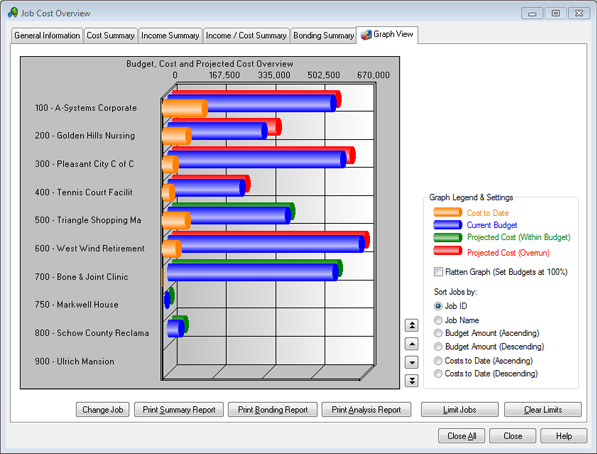
New Job Graphing Enhances Job Cost Overview Usefulness
- New graphs have been added to the Job Costing Overview.
- FormMaker can now print Page Forms, allowing an entire form background to be created (including vertical lines on Invoices, Purchase Orders, etc.).
- Payroll system now tracks Quarter-to-Date and Year-to-Date Fringe Benefit amounts.
- OSHA Forms can now be printed for illness or injury reporting.
- The Employee Listing Report can now be set to to print only the employees with expired documents.
- An “Overview” button has been added to the Job Setup window, allowing users to jump from Job Setup to the Job Cost Overview window for the current job.
- A new Job Cost report, the “Universal Job Report,” has been added. This is a compilation of Summary, Analysis, Detail and Bonding reports for a selected job, all at the same time. These reports may be previewed as normal reports, or they can be compiled into a single PDF, which includes all the reports.
|
- The A/P Posted Invoice Analysis report can now be limited by Check Number.
- The Description field for A/P Invoice Detail line items has been greatly expanded.
- The Customer Statement now prints the customer's finance charge rate and terms at the bottom of the page.
- The button to Print Receipts on the Receipts Entry window now has the option of printing all Receipts in the Batch.
- When entering a Transaction, a new button allows the reversal of the sign (credit to debit or vice-versa) of the current line item.
- JobView now remembers the Over/Under Statement Line Items entered in Financial Statement Printing. If another Financial Statement Printing limit is created, these saved Over/Under settings are automatically retrieved.
- When making a backup, it is now possible to enter a description unique to that backup.
- JVNotify (the program that downloads updates from the internet) now allows for scheduled updating. The user can now specify hourly, daily or weekly, as well as set a specific time for updates to be downloaded.
|
Version 10.2
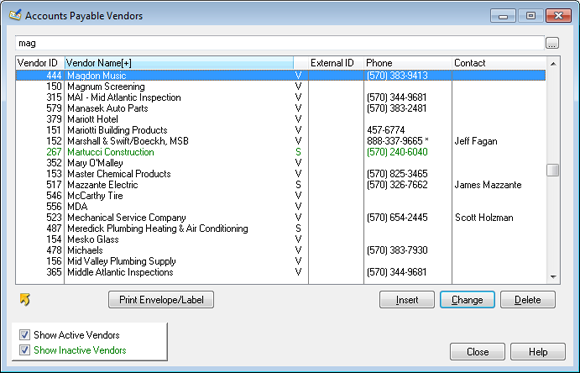
Browse Windows May Now Be Sorted By Clicking On A Column Header
- All Browse Windows have been modified to do an Instant Sort by clicking on the Label boxes at the top of each column, eliminating the former Sort Tabs.
- To comply with the new IRS Program, Hiring Incentives to Restore Employment Act (HIRE), for certain newly-hired employees, JobView may now be set up to “skip” the Employer Portion of Social Security Accrual through the end of calendar year 2010.
- There are more “user-definable” fields in Box 14 of Form W-2.
- Company logos may be added to Subcontract, Owner Change Order, and Subcontract Change Order forms.
- A new Bonding Report format has been created that prints Labor and Labor Burden costs, separately broken out.
- The Job Setup window can now store the Address where the Certification Report is to be mailed. An envelope may also be printed when the Certification Report is printed.
|
- The Vendor Listing may now be limited to vendors associated with a specific Job. JobView will include all vendors tied to Cost Code Budgets or Invoices associated with that Job.
- Auto Job Billing now allows for more user-defined options in the creation of Invoices.
- A Default Invoice Memo may be stored in Setup Options to be automatically inserted into the Memo field of all newly entered Invoices.
- The Product Photo may now be displayed on the Cash Register window.
- When importing Items, the information on an Imported Item may be used to update an existing Item, if the Item ID matches.
- The View Postings and Backups list of completed postings now displays in red any posting that was completed with warnings or errors.
- A General Ledger Transaction group may now be tagged as an Adjusting Entry. GL reports may now be filtered to show only these Adjusting Entries.
|
Version 10.1
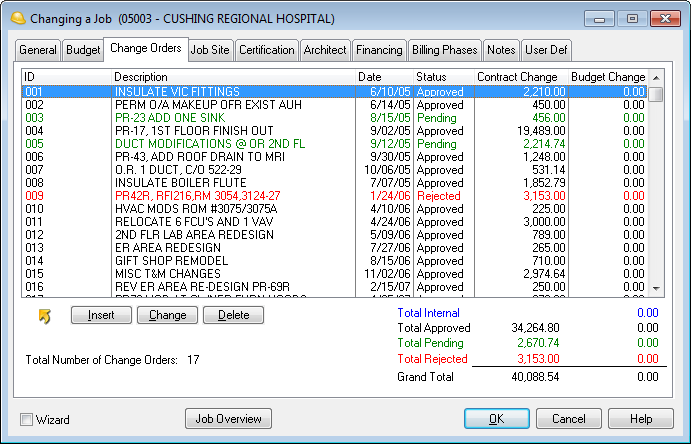
New Color Coding of Change Orders by Change Order Status
- The Job Setup > Change Order tab displays changed orders by color according to the Change Order Type.
- Two new Change Order forms have been added: Change Order to Owner form includes the line item detail of all the costs associated with a Change Order.
- The Job Listing may now be exported.
- In DataView, built-in Simple Filters now include a “not equal to” option.
- Timesheet Proof Listing now has a limit to hide or “mask off” the employee rates.
- When setting up an employee with a Percent of Net type deduction, the option is there to set it for either Net After Taxes or Net After All Deductions.
- Column headings for EEO and Certification reports may now be customized for labeling minority groups, accommodating the different names as they change.
|
- The Detailed Subcontractor Status Report now includes Change Order Descriptions.
- AR Invoices may now be exported. When an Invoice form is displayed in the Print Preview window, it may now be exported like other reports.
- Auto Job Billing now marks up labor costs using Employee Charge Rates, charging Rate 2 for Overtime Hours and Rate 3 for Premium Hours. In addition, the Description field on the billing line item now indicates whether hours are Overtime or Premium.
- A new Inventory Report called “Bill of Materials” was added.
- Purchase Orders may be created directly from within the Inventory Pick Ticket entry screen.
- The Item Master Listing has the option of excluding any items where the inventory on hand level is zero.
|
Version 10.0
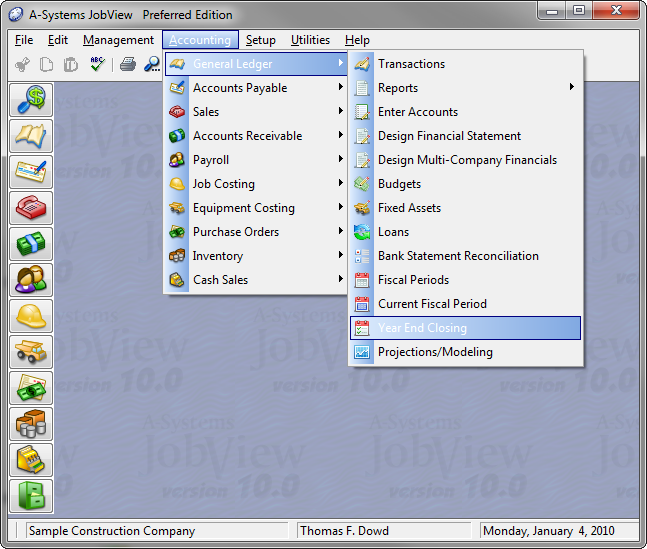
New Look with Menu Icons
- All existing reports in all modules may be “copied” to create a new report. This allows an existing report to be saved, while a new, modified version of it may be copied and saved.
- When entering data into a Batch, the screen now displays which batch is being used. For example, the Trade Invoice Entry screen now says, “Adding an Invoice in Batch (2) Standard Invoices.”
- A new “Path Label” was added at the bottom of all reports, indicating where the report is found within JobView. For instance, a Certified Payroll Report would have a path of: Payroll > Reports > Certification Report.
- Salary information on salaried employees may now be retrieved and distributed on ALL Timesheet Entry tabs, including Weekly and Biweekly.
- Purchase Orders may be generated for line items during Job Setup, from the Budget Entry tab.
|
- All Subcontracts on the same Job under the same Subcontractor, may be combined under one Subcontract.
- When Voiding AP Invoices, invoices may be looked up by Invoice Number or Dollar Amount.
- A Customer Receipt may be printed directly from within the Receipts Entry screen.
- Multiple Accounts Receivable G/L (Control) Accounts may be set up. This allows a company to have different A/R Accounts to track them by different categories, by department, by state, etc.
- Envelopes may be printed for “contact groups.”
- In the View Postings and Backups option, multiple Postings may be tagged to generate a single PDF file.
|
Version 9.2
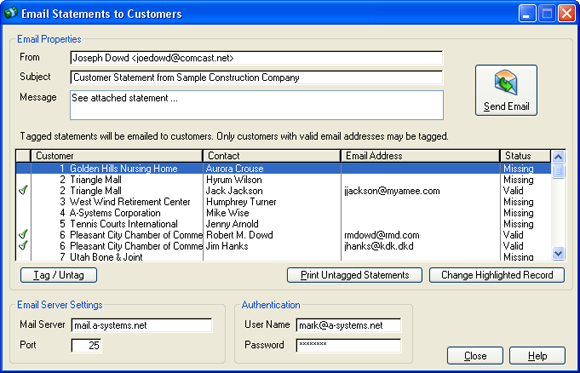
This is the new Email Statements window.
- AR Statements can now be emailed to all customers in one process.
- Any “Previewed” report may be immediately exported into an MS Excel file, complete with columns. This new Export capacity is available only in the add-on function, Import/Export.
- An envelope or one-time label may be printed for any Employee, Customer, Vendor, Subcontractor, Job Address, or Contact (in the Contact Manager.)
- The Payroll Certification Report may now be limited by Employee.
- The Payroll Posting Summary of Accruals Report now prints the codes for individual's Workers Comp and General Liability.
- In Accounts Payable, EFT transfers may now be made to vendor checking or savings accounts.
|
- When importing Inventory Items, Vendor Pricing may be included, along with the option of changing Vendor Pricing in existing items.
- Transactions may now be created directly within Bank Statement Reconciliation.
- Transaction “notes” may now be printed on any report that itemizes transactions: GL Transaction Listings, Job Cost Detail Listings, Equipment Detail Listings, etc.
- All Job Costing reports may now be limited by Job Dates, including Job Entry Date, Construction Start Date, Estimated Completion Date, Substantial Completion Date, Actual Completion Date, Contract Date, Last Application Date, Loan Date, Loan Due Date, and Last Billing Date.
- The Preferred Edition allows the user to “drill down” on any line item in DataView reports.
|
Version 9.1
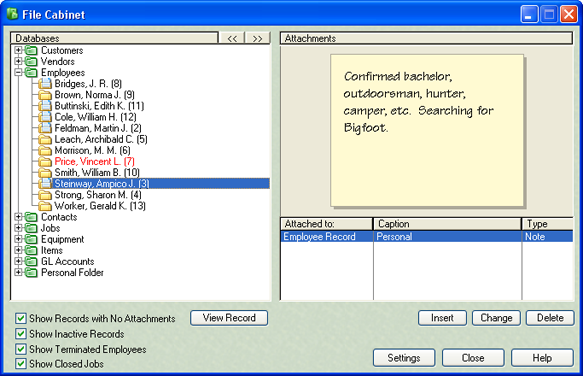
This is the new File Cabinet window.
- The new electronic File Cabinet module adds a convenience factor that allows you to go to a central place and see all the attachments and notes for all database records.
- JobView will now automatically check this web site for updated program files. If newer files are found, they will be automatically downloaded without any effort on the part of the user.
- A new Time Billing procedure allows JobView to automatically generate a billing for non-job hours entered through Payroll Timesheets.
- Two new standard insurance types, Excess Liability and Auto, have been added to Vendor Entry.
- A job can now be billed to two separate customers (i.e. Insurance Company and Insured).
|
- The IRS Form 940 report now fills in information, the same as the IRS Form 941.
- A new option allows the printing of just the Instant Checks on the Check Register
- If a user attempts to delete an Instant Check that has been printed but not posted, a new warning will come to the screen. Also, a permanent record of that deletion will be saved.
- When changes are made to the Vendor Record, they are automatically noted and recorded as an auto-note.
- The Job Cost Detail Report now prints the current Cost Code as a label at the top of every page.
- Credit Cards are now included in the main Ratio on the Company Overview screen
|
Version 9.0
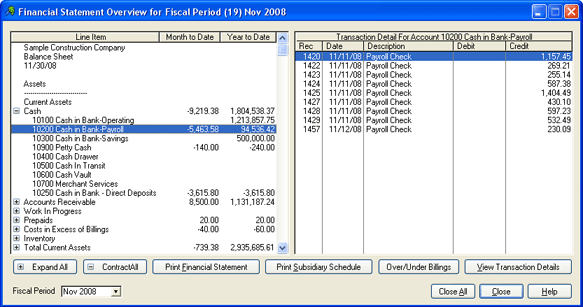
This is the new drill-down capable Financial Statement Overview window.
- The Financial Statement Overview has been “Activated,” allowing users to expand or contract accounts and see Transaction Detail
- A new Deduction History report has been added. This report can total all 401(k) Contributions for the year for all employees.
- Voided Checks, Invoices, Receipts and Timesheets can now have an accompanying Void Reason.
- Employee Listing can now include Employee Tenure, including elapsed time since hire date, total months worked, and total pay periods worked.
- Subcontract, Owner Change Order, and Subcontract Change Order Forms can now be printed.
- Subcontract Change Orders can now be numbered by the user.
|
- Vendors can now be paid using EFT (Electronic Funds Transfer). The system creates an ACH File to send to your bank.
- Duplicate Invoice Warnings during AP Invoice Entry now allow the user to view the duplicate invoice immediately. AP Aging As-Of a prior period can now include 30, 60, & 90 day past due columns.
- AP Checks can now be printed in Vendor Number or Vendor Name order.
- During Customer Entry, historical AR Invoices for the customer can be reprinted all at once, with date and invoice number limits.
- A new Map Button (an icon of a globe) is now located on all screens where a physical address is displayed. Clicking the button will retrieve a Google Map of the location or driving directions from your company to the location.
|
Version 8.2
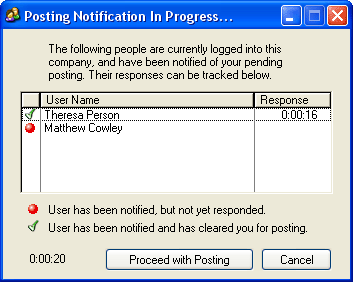
This window displays when a posting is attempted while
other users are logged into the same company.
- A new Posting Notification System warns other users that you are about to post and optionally asks them for confirmation.
- When printing Instant Checks, you can now print an alignment check and indicate how many check copies to print.
- DataView Information can now be exported to tab-delimited text or opened immediately in Microsoft Excel.
- Jump directly to Windows Explorer to view the contents of company data folders.
- Transaction Entry and Transaction Listings now display entries in Debit and Credit columns.
- More options for customization of ACH File created during Direct Deposit postings.
|
- Added new tracking for Railroad Payroll.
- A whole new series of drill-downs from the Company Overview screen let you view Recent Activity.
- A new Maximum Invoice Amount setting keeps you from accidentally posting abnormally high AP Invoice amounts.
- AP Check Stubs can now include Invoice Detail.
- The AP Aging Report can now be printed for just Held Invoices.
- Project Manager and Job Superintendent titles can now be soft-coded by the user.
- AP Invoice Entry now warns the user if the invoice detail will push the job cost code over budget.
|
Version 8.1
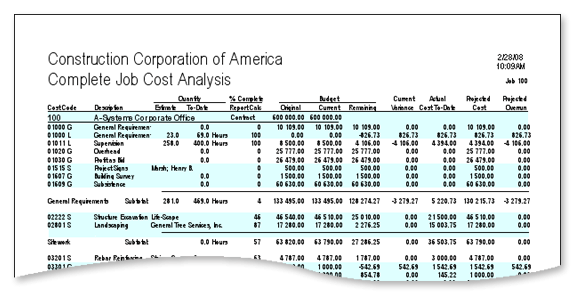
Readability Bars
- Optional Readability Bars are now available on all Job Costing reports & Contractor Draw Requests.
- The Invoice browse on the AP Invoice Batch Entry screen now indicates the Payment Status of all the unposted invoices in the highlighted batch.
- All Job Transaction Detail can now be moved from one job to another job.
- When adding departments to a financial statement, the system can now Duplicate an Existing Department.
- In the Timesheet Entry Screens, the user can now choose to sort entered timesheet line items by Job.
|
- Employee Records can now store a Default Job & Cost Code for use during Timesheet Entry.
- The Payroll Certification Report can now be printed for a Range of Dates.
- A new Gross Profit Percent column has been added to the Cost vs. Billing Job Cost Summary Report.
- When sending emails from the Contact Manager, the system now supports Authentication.
- The user can now determine whether or not to include Paycheck Information on the Payroll Certification Report.
|
Version 8.0
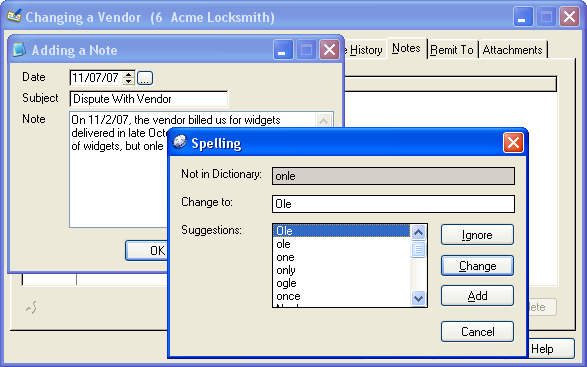
Spell-Checking
- Spell Checking is available wherever text can be entered.
- Auto-Fill will finish your entries with frequently-entered text.
- On every Report Limit Screen, you can now press a button to clear all the limits.
- Timesheet Entry will now warn you if the employee is running out of accrued Vacation or Sick Pay hours.
- Attachments can be added to Employee, Customer and Vendor files
- On Report Limit Screens, the “To” value of a limit range now automatically inherits the entered “From” value.
- You can now manually prioritize the order in which Standard Deductions are taken.
|
- All List Boxes can now be sorted by the value displayed in any column.
- Employee Listings & Checks can now use either the employee legal name or preferred name.
- Text entry fields will now respond to Right-Click for Edit, Copy & Paste commands.
- AP Invoices can be placed on hold while still in the batch waiting to be posted.
- TheAP Aging Report can now produce a separate page for each Vendor.
- The Certified Payroll Report can now include Premium Hours.
- Employees can now be “Color-Coded” according to Category in Employee List Boxes.
|
Version 7.2
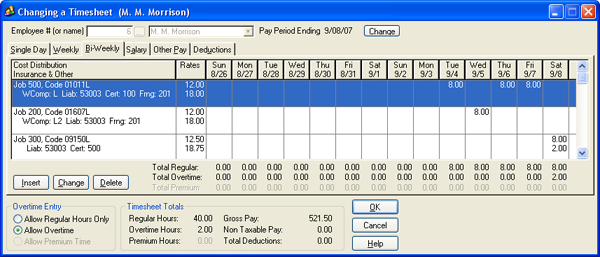
New Bi-Weekly Timesheet Entry Screen
- A Bi-Weekly option was added to Timesheet Entry.
- Employee Deductions can be modified on-the-fly during Timesheet Entry
- Duplicate Employees, Customers or Vendors can be merged.
- Miscellaneous Receipts can now be applied to a Job/Cost Code combination.
- Refund Checks can be generated for outstanding receipts.
- Canada’s GST and PST taxes are now supported in Payables and Receivables.
- Multiple jobs can be tagged for deletion at the same time.
|
- A Cost Code Pick List has been added to limit screens for appropriate reports.
- The Trial Balance report can be limited to a range of accounts, and zero-balance accounts can be skipped.
- An auto-void program has been added for GL Instant Checks.
- A Drill Down capability has been added to the MTD Billings and YTD Billings figures on the Company Overview.
- The posting Confirmation Page is no longer printed, but is archived as a PDF file, saving paper.
|
Version 7.1
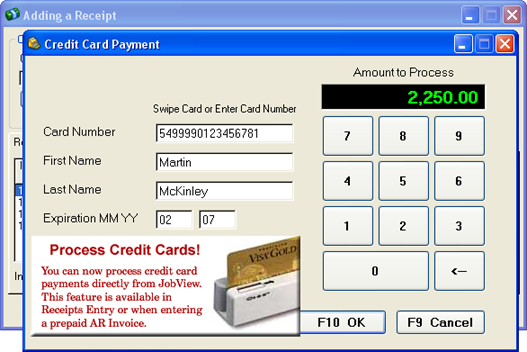
New Point of Sale Cash Register Program
- Credit Card Processing is now available in Cash Sales, Receipts Entry and AR Invoice Entry.
- Credit Card Payments can also be made in Accounts Payable Payment Selection and Invoice Entry.
- Bank Statement Reconciliation now also works for Credit Card statements.
- The system now prints the 1099-INT (Interest Payments) form.
- During AP Check Printing, an electronic file may be created to send to the bank, listing Check #, Amount and Payee.
|
- Images, PDFs and other electronic files can be attached to individual invoices, receipts, jobs, etc.
- When printing a Financial Statement, the Year-to-Date column may be omitted.
- Purchase Orders can be created automatically from a Sales Order.
- The help file now includes a comprehensive explanation of how to set up Payroll Direct Deposit.
- Bonding Reports can now be printed by department
|
Version 7.0
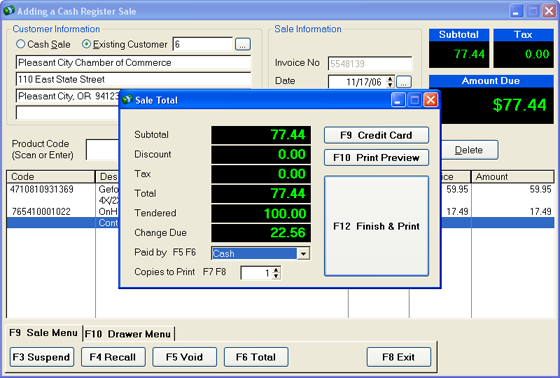
New Point of Sale Cash Register Program
- A new Point of Sale capability has been added. Use a barcode scanner to scan in items to be purchased, the system will retrieve the items from your inventory and create cash sale records to be posted at the end of each day.
- Payment Selection invoices can now be sorted by Job.
- When entering Timesheets, the system will now show you all hours entered for the current employee and date, ensuring that you never over-state an employee's hours again
|
- A new report has been added that shows how much a Vendor has been paid as a Co-Payee.
- A default GL Account for timesheet entry can be entered for individual employees.
- Payroll Shift Differentials can now completely replace the employee hourly rate.
- The system now accrues Vacation, Sick Pay and Pension automatically.
- GL Trial Balance listing can now be exported to a spreadsheet file.
|
Version 6.2
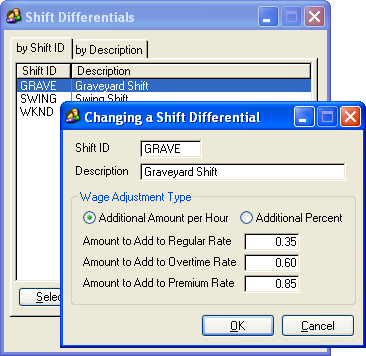
New Shift Differential Setup
- A new Shift Differential feature allows the user to set up shift differentials to modify employee wage rates depending upon which shift they work. Each employee can have a default shift differential, and a different shift differential can be selected on the fly during timesheet entry.
- A new Paperless Office function has been added for all posting reports. The audit trail is now documented using PDF files, which can be archived for later retrieval and printing. The user can choose whether or not to print posting reports during the posting process.
- A new feature allows the software to run properly on Notebook Computers, even if they have been disconnected from the office network.
- Any report can now be Converted to a PDF File and viewed immediately using a PDF viewer.
- The system administrator can now specify which users have permission to finish postings with errors.
|
- A new Check Format, 9209, has been added to accommodate users who have remaining QuickBooks® check stock.
- Repeating batches can now have their dates incremented automatically by a number of months in addition to a number of days.
- In all modules, any transaction batch which contains entries now shows up in BOLD lettering in the batch entry screen.
- Standard paycheck formats can now include the number of hours of vacation or sick pay remaining for the employee.
- Costs from unposted AP Invoices and PR Timesheets can now be included on the Job Cost Detail Listing.
- Payroll and Accounts Payable Check Formats can now be customized by the user, regardless of whether the user has purchased FormMaker
|
Version 6.1
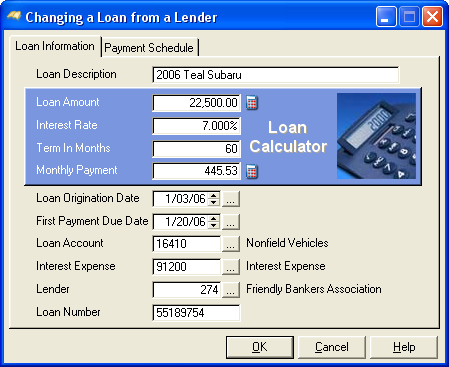
New Loan Tracking Program
- Loans Payable can be set up with amortization schedules. This also includes a procedure to create monthly Accounts Payable Invoices for those loan payments. This powerful new function includes a "Loan Calculator," which can be used to do "quick" calculations of monthly loan payments on proposed loans.
- When starting a posting routine, the system can now assist you in making a Pre-Posting Backup of the data files before proceeding with the posting.
- A new Utility allows the Conversion of Data from an ALL CAPS format to a First Letter Capitalized data format. For example, "JOHNSON CONTROLS" will be converted to "Johnson Controls."
- Posted Timesheets may now be voided automatically.
- Timesheets, Hand checks, and Void Checks are now all entered in the same screen not different screens.
|
- In the Invoice Payment selection window, invoices that are "On Hold" are now displayed in Red.
- Vendor, Customer, and Employee limits on report printing limit screens now allow for a List in addition to a Range.
- A new Utility now allows the ability to Move Single Transactions from one Job or General Ledger Account to another. This enhancement was also a CONTEST WINNER at a recent Users Conference.
- In State Tax Setup, a new button allows all Workers Comp or General Liability rates for that state to be increased by a specific Percentage Rate.
- A new Cost Code type has been added. In addition to Labor, Materials, Subcontracts, Equipment, and General types, there is a new Blank type, which is user definable.
|
Version 6.0
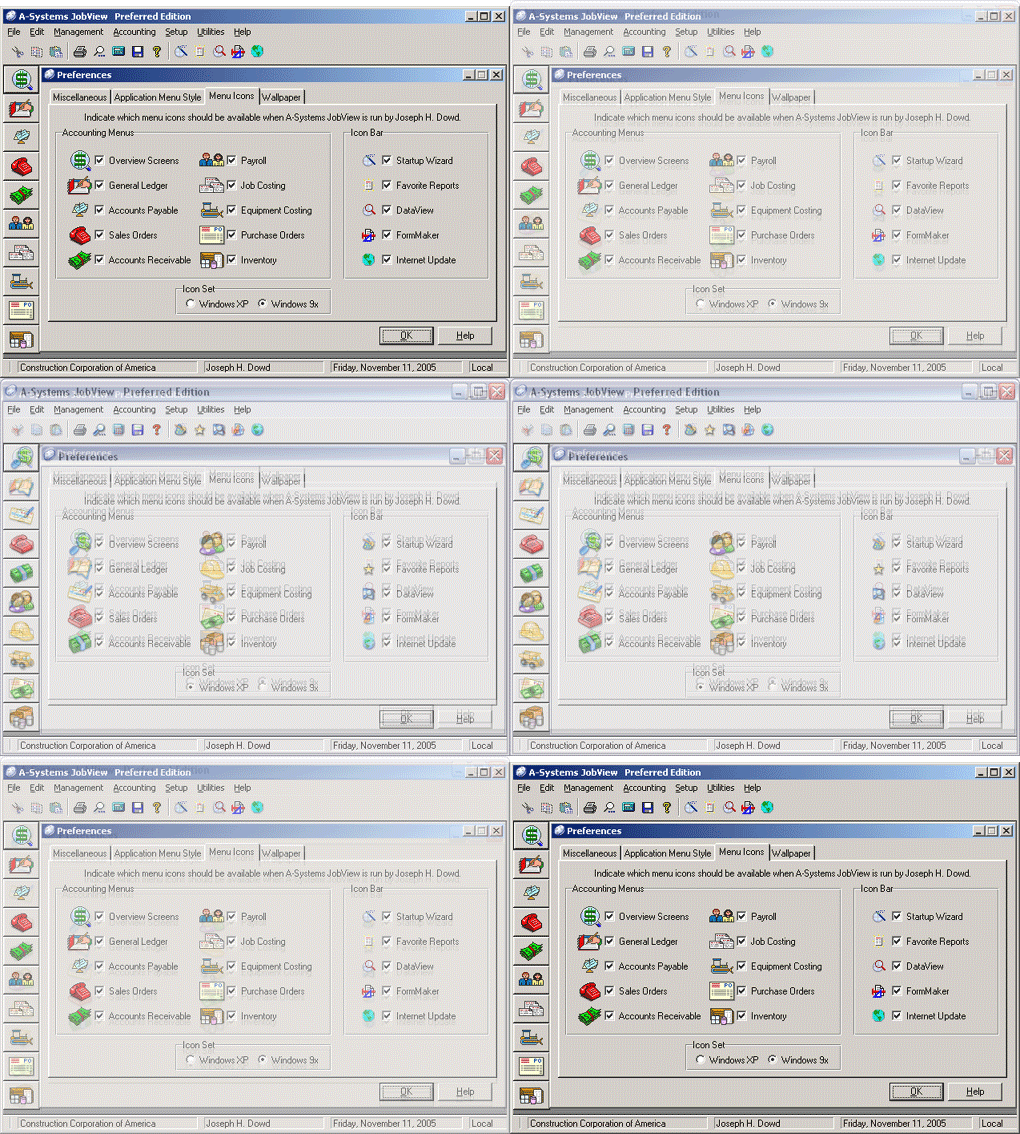
Comparison of New XP-Style Icons with previous icons
- A Multi-Company Financial Statement can now be designed and printed, pulling figures from company data stored in different locations.
- Standard Financial Statements can now be customized by adding commas to figures and selecting a date printing format.
- During GL Transaction Entry, you can now pick from a list of prior postings and the system will automatically create a reversing entry.
- On all Job Costing Reports, you can now select to print either All Jobs, a Range of Jobs or create your own customized List of Jobs.
- When Dragging Transactions, Invoices or Timecards to another batch, the existing transaction can now be either Moved or Copied into the new batch.
|
- A new interface with Aatrix Software allows you to print State and Federal Tax Forms directly from the payroll information in your accounting system.
- The program was enhanced to work properly when being accessed by multiple users via Remote Desktop or Terminal Server.
- The column heading section of the DataView on-screen list box now indicates which column the list is sorted on.
- Revisions to an “Approved” Change Order Amount now automatically update the associated Contractor Draw Request line item amount.
- “Pending” Change Order totals are now included on the Subcontract Status Report and Subcontract Status Review screen.
|
Version 5.1
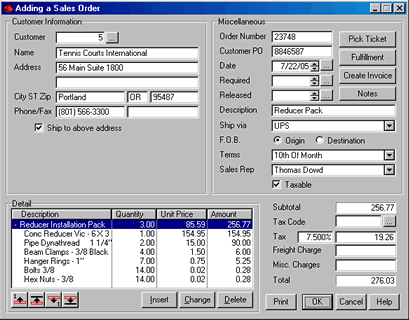
Bundle Item Displayed During Sales Order Entry
- The Item Price File can now handle both Assemblies and Bundles. Assemblies are lists of component parts that are assembled prior to being sold. Bundles are lists of component parts that are pulled together at the time of purchase and can be modified at the time the order is entered into the computer.
- Payroll can now track reported Tips (tips kept by employee) and retained tips (tips collected by the employer and paid to the employee in paycheck).
- Payroll and Accounts Receivable team up to allow you to track and pay Commissions tied to individual AR Invoices
- Price Quotes can now be duplicated for re-use.
|
- In Check Printing, if the total of the selected checks exceeds the displayed account balance, the software will give a warning.
- In a Multi-user setting, the software now tracks and remembers who is posting at any given time. If you attempt to post while another person is posting, they system now tells you who it is, and what they are posting.
- In Accounts Payable, 1099s can now be printed in alphabetic order by Vendor Name.
- The system now adds quantities to Inventory On Hand during Reconciliation of Purchase Order with Packing Slip.
- The system now removes quantities from Inventory On Hand during Sales Order Fulfillment.
|
Version 5.0
Project your financial status three years into the future
- A totally new General Ledger function was added that allows you to project your financial status three years into the future. This includes Pro Forma Balance Sheets, Profit & Loss Statements, and Cash Flow Summaries.
- Any General Ledger Account may now be flagged as a “Distributable” account. This means that any amount posted to this account will automatically be distributed to a user-defined list of “Sub-Accounts” at user-defined percentages. This is a great feature for Departmentalized Income Statements.
- A brand new Fixed Asset Report shows information on all fixed assets at a glance.
|
- Payroll Timesheet Posting can now create unposted A/P Invoices for Payment of Payroll Accruals & Withholdings! This feature was the winner of the Suggestion Box contest at a recent User Conference.
- A new Payroll Recalculation utility adds up all posting information for any user-selected year and re-fills the Year to Date and Quarter to Date fields in employee records.
- Certification Reports can now print the official DD Form 879 Statement of Compliance.
- Checks Numbers sequences can now be tracked for multiple A/P and P/R checking accounts.
|
Version 4.2
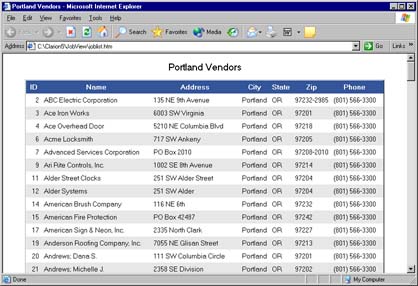
- The contents of any List Box can now be exported, printed, or emailed. Export formats include Microsoft Word and Excel, as well as HTML (web page).
- You now have the option of creating Multiple Batches for entering Accounts Receivable Receipts.
- A new Streamline Sales Tax (SST) Report has been added to accommodate 42 states that have adopted or will be adopting the SST.
- All Alphabetic Data Fields in DataView can now hold up to 50 characters.
|
- Checking Account Balances can now be displayed during Accounts Payable and Payroll check printing.
- When Voiding an Accounts Payable Check or Invoice, the system can now place an unposted copy of the invoice in a live invoice batch.
- Check and Invoice Voids can now be posted either to the current Fiscal Period or the original Fiscal Period.
- A new Report Limit Lock feature lets the user who created a particular report disallow other users from making changes to the "locked" report limits.
|
Version 4.0
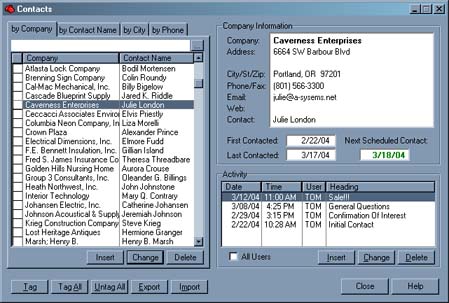
- A New Contact Manager system has been added. You can now keep a list of contacts, and track your communication with these contacts. Write form letters and keep a database of letters and email messages! Create groups of contacts by using a filter expression or by picking individuals! Send an instant email message or print a form letter for an individual or group!
- Now each JobView user can choose from JobView’s traditional popup menus or New Stay-In-Place Menus. Each user can also determine which menu icons they want to be displayed when they run JobView.
- A New Search Capability has been added to all major browse screens in the system. For example, when you're picking a vendor from the vendor list and you know that the vendor name contains the word “carbon,” you simply press the F2 button, type “carbon,” and watch the list filter down to just the vendors with “carbon” anywhere in the vendor name.
|
- JobView can now print W-2 and 1099 forms on blank paper, eliminating the need to purchase pre-printed forms.
- Job cost Additional Burdens can now be calculated as a dollar amount per unit as well as a blanket percentage.
- The Long Form Bonding Report can now be printed on one legal sized page. Also, an exact replica of the bonding report can be exported to a text file for import into a word processor or spreadsheet.
- Equipment Costing now includes Maintenance Scheduling! On any existing cost category, specify how frequently this maintenance item must be performed. The system will track when each service is performed and reports can be run to project when the next service is due.
|